How to repair Outlook 2019 corrupted PST file
Recovery Toolbox for Outlook
Recovery Toolbox for Outlook helps to repair and fix emails, contacts, tasks, appointments, attachments, notes, calendars, journals, and other data from damaged MS Outlook 2019 PST files

Quick Outlook 2019 PST file repairing
Corrupt PST files in Outlook 2019 can deny you access to all your emails, contacts, appointments and more. In this article, you will learn how to fix a corrupt PST file 2019 using Recovery Toolbox for Outlook or its online Outlook 2019 repair services.
When there is a need to repair PST 2019 files:
- Outlook 2019 folders need to be more readable.
- Errors occur when sending or receiving emails in Outlook 2019.
- Outlook 2019 fails unexpectedly.
The quick and best solution for bad Outlook 2019 PST files is to use Recovery Toolbox for Outlook to repair Outlook 2019 PST files quickly and efficiently or use the Outlook 2019 online repair service from any device (phone, tablet, or computer).
Steps to repair corrupted PST file of Outlook 2019
1: Finding the location of the corrupted PST file on your computer
To fix a corrupted PST file, you first need to locate the file:
- Open Windows Explorer.
- Select the disk where Outlook data is stored (usually C:\).
- Type *.pst in the search bar.
It is also possible to find the PST file directly in Outlook:
- Start Microsoft Outlook 2019.
- Go to the File > Information menu.
- Click Account Settings > Account Settings again.
- Click the Data Files tab.
- Select the File to be used and click Open File Location.

2: Backing up a PST file
Before proceeding, back up the corrupted File by copying it to another folder or disk.

3: Recovery with Recovery Toolbox for Outlook
Recovery Toolbox for Outlook offers a time-tested solution to repair 2019 PST files locally offline. Follow the steps below:
- Download and install Recovery Toolbox for Outlook from the official website.
- Run the tool and select the corrupted PST file.
- Select Recovery Mode.
- Run the file analysis and wait for the process to complete.
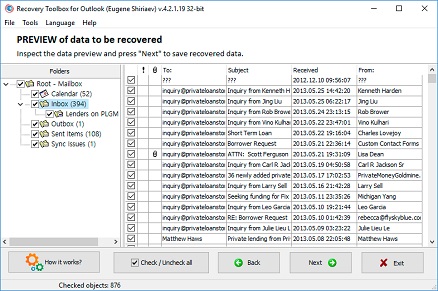
- Review the repaired data.
- Save the repaired file in PST format and put it in a safe location.
- Reconnect the repaired File to Outlook (see below).
4: PST Recovery 2019 online
If you prefer not to install software, use the online PST 2019 repair service. Instructions on how to do it:
- Go to https://outlook.recoverytoolbox.com/online/.
- Download the corrupted PST 2019 file.
- Pay for PST file repairing services.
- Download the repaired PST file.
- Connect the repaired PST file in Outlook.

5: Connect the repaired PST file to Outlook
- Open Outlook 2019 and go to File > Information.
- Select Account Settings > Account Settings.
- Go to the Data Files tab and click the Delete button to delete the corrupt file.
- Click the Add button and navigate to the repaired PST 2019 file.
- Restart Outlook and see if the problem is fixed.
The most common causes of PST 2019 file corruption are:
- Virus attacks: Malware or ransomware can encrypt the headers and endings of PST files.
- Power failure: Sudden power outages while working with PST files.
- Hardware problems: Failed hard disks or faulty RAM.
- Large file sizes: Overloaded and oversized PST files beyond optimal size limits.
- Windows Updates: Incompatibilities caused by new updates from Microsoft.


Tips to prevent PST file corruption:
- Backup regularly: Always keep a backup of your PST files.
- Use reliable antivirus software: Make sure that your antivirus is configured to not interfere with Outlook files. Files and folders containing PST files should be added to antivirus program exclusions.
- Monitor PST file sizes: Split or archive large PST files.
- Maintain free disk space: Ensure sufficient storage space for smooth operation.
Frequently Asked Questions
- Can I repair and fix a PST files larger than 50 GB?
Yes, the Recovery Toolbox for Outlook can work with files larger than 50 GB - however, the repairing time increases as the file size increases. For a PST file larger than 50GB, it can take several days.
- Is 100% fix possible?
Full recovery depends on the extent of the damage. Blocks of missing data can only be recovered with backups.
- What is the cost of repairing PST 2019 files?
- Recovery Toolbox license: Price details are here. The demo version allows you to test the tool before purchasing.
- Online service: $10 for 1 GB of source PST file.
Why choose Recovery Toolbox for Outlook?
Benefits of Recovery Toolbox for Outlook:
- No dependence on the internet.
- Secure local file processing.
- Works on Windows systems.
- There are no restrictions on file sizes.
- There is no limit to the number of files to recover and additional charges per repaired PST 2019 file.
Advantages of online Outlook 2019 repair service:
- Compatible with Mac, iOS, Android and Linux.
- No installation is required.
- Ideal for small PST 2019 files.
This manual helps you repair corrupt Outlook 2019 PST files and regain access to your important business and personal data. Whether you choose the Recovery Toolbox for Outlook program or an online service, both offer fast and the best solutions to repair Outlook PST 2019 files.


Victor G. Bobrov, Chief Software Engineer and File Recovery Expert.
MCSD, MCDBA
Microsoft Outlook expert in storing and displaying data from PST and OST files, specialist in converting and recovering data from PST/OST files with over 20 years of experience.
Victor Bobrov is a senior data recovery specialist with 15+ years of experience in Microsoft Exchange Architecture and PST structure forensics.
Victor Bobrov is listed as the author and reviewer of this Outlook Repair guide and is connected in structured data as the creator of the Recovery Toolbox for Outlook Repair Tool.
Customer's reviews and ratings:
Thanks to the program I can recover my email history
Amazing Proto Class program
Thank you. This application is very useful.
first time using this, hopefully it helps recover my acadmic materials...
good app
Amazing
He saved my life
The program works quickly and very well, although it did fail with one folder (but other programs did too). Overall, 10/10.
good tool
Impresionante, no imaginé tal eficiencia, muchas gracias.
These guys are great. I was able to recover the 5 most recent emails from each and every sub folder. This is the free version. It's a life (email) saver. Thank you.
80 años. Retirado. RECOVERY,TOOLBOX, facilísimo de usar. Fabuloso.
This is gold.. loved the service
I accidentally deleted files in my email inbox, and I was able to recover many of the deleted files using your tool.
:=)
I lost the files after a computer crash.
Had to re-install windows.
I want to recover all pst, and ost. Files.
canot tell 100000000 thanks
Repairing a damaged PST file. I was able to recover most of my emails.
nice
Excelente programa, mis felicitaciones.
super recovery, very fast and did a perfect job, can recommend to any one looking for recovery software.
100% ist Gut!
Hello Recovery Toolbox team,
thank you very much for your support. One of my PCs froze, forcing me to do a hard reset. At the time, Outlook was open. After the restart, Outlook could no longer find the PST. Renaming the PST wasn't possible, even in safe mode. Apparently, a program was accessing the PST even though Outlook was closed on all computers. A Google search led me to your tool. After the repair (2-3 hours), I was able to save the PST under a new name and use it again.
Thanks again.
Best regards, Dietmar Kroschel
I needed to access OST files on an old hard disk. As I don't use Outlook as email client, I needed to find a tool. I was not recovering from corrupted data.
Thanks for making the tool👍
Feels good! i like it! thnx for devs
its workilng very well in 2025 thank you
Great program, really helped me out!
Excel.lent! I couldn't with other applications and this one worked the first time!
Good program
sir best softwear for everyone . Thanks
Tank you very very much the software is help full
Had my agenda only in the ost, so not synched to the webmail.
After making a new profile my agenda items were gone. Used the Recovery tool for Outlook to restore the items to a PST from a backup of the old OST files. And then copied them back to my agenda.
This worked well although only the agenda item are restored, not the attachments and extra information field.
VERY GOOD
Really works. It identifies the bad sectors and skips them while getting rest of the data out.
Love it.. except.. you should consider including a PAUSE/RESUME button. Just sayin'. Thanks.
I wanted to send a large pdf file (20Mb).
While sending I disrupted this process (turned off pc?). As a result I had an unclosed mail in my pst-file. As a result my pst-file was corrupted and my outlook could no longer be started/opened.
This tool fixed PST-file.
Recovery Toolbox for Outlook was able to convert an .OST to .PST, but the ability to open the .PST is missing. The help text says it is under the File menu, but all that is there is "Exit".
Хорошая вещь! Отлично справляется, за секунду исправил испорченный файл.
I don't know if the files were damaged, but they could well have been. These two files were backups of PST files that I had made before transitioning from the POP mail protocol to IMAP.
IMAP attached itself to my original emails and, apparently, those stored as backups. Then all the open folders in Outlook began to disappear until there were none remaining. I had no clue what had happened. I couldn't imagine they were hijacked and held at the mercy of my ISP. Then IMAP somehow transformed my PST backup files into OST files, which Outlook 2024 cannot read.
The Toolbox was able to quickly and efficiently recreate the files as PST.
That allowed me to restore and open every one of the 24,000 files.
Later, I learned that IMAP doesn't just sync emails created after its implementation but every file that it automatically and without permission opens in Outlook. I was unaware that this caused me to exceed my storage limit, leading to the disappearance of my 24,000 emails.
It is a hazardous, intrusive, and damaging protocol. It is also a potentially lucrative source of business for your company.
Best
nice
I exported from Oulook 365 a folder with a lot of e-mails, ans had a .pst 2,28 Go file. Then, I did a factory reset of my PC. I could of course import the pst file in Outlook, but I did not wanted to do that, in order to avoid duplicates in Outlook. So, I used Toolbox recovery to convert the pst file in msg, ans I copied and paste the msg files in Outlook, and it worked perfectly.
I am using Microsoft Outlook and for some unknown reason I was unable to export my OST file to PST file.
Windows stopped working properly and I had to restore it. It went well, but I lost all the applications that were not part of Windows, such as Microsoft Office.
I reinstalled Microsoft Office but Outlook can't open the OST file. So I had to use Recovery Tollbox to convert it to a PST file.
Everything went well and I recovered my old emails and contacts.
Okay, here is the why I am so frustrated at the moment with the recovery of emails from Outlook.
Apparently, there was an upgrade to Outlook that my system allowed and the program would not load. I followed instructions on how to get it to load from MS support forum and it finally loaded however all my contacts were lost. Again, following MS support I deleted the email account and reinstalled it and that is when everything went south in a big way.
Now I had some of my contacts back (from the cloud) but none of my stored files inside Outlook. I purchased the Recovery Toolbox to retrieve those files. While running the program I could see the files being recovered in the folders and subfolders that they were originally stored in. But, when the recovery was complete the files were not in the folder and subfolder in my Outlook but in individual unsorted and ungrouped emails. That said, the folders and subfolders did come over as they were supposed to on my Iphone! Well, now Outlook determined that I am over quota on emails and will not let new emails arrive.
I deleted as many non-essential emails, files and folders that I could in Outlook so that I can receive a few emails before I have to delete some more. I AM AFRAID TO DELETE OR MOVE ANY OF THE FOLDERS AND SUBFOLDERS ON MY IPHONE FOR FEAR THAT I WILL LOSE THEM.
So, I want to get away from Outlook so downloaded em Client but when I try to allow Outlook to download my main email to the new program I get the error “there was an error obtaining credentials via oAuth”.
And that is where I am, stuck with no way to consistently receive emails on my main email address and no way to move my emails to a new program. Also, I am really afraid that I will lose all the folders and subfolders on my Iphone if I don’t get them saved to a hard drive or somewhere else.
Excelente Aplicación
Hello.
I don't know exactly what I expected, but probably more than I got.
It may well be that my emails were recreated but all emails are empty. I can see sender and recipient but that's all.
I had probably hoped that some emails could be recreated so that I could read the whole email. But no waste of money.
Kind regards
Kuno Nielsen
all perfect ! good job thanks
Çok Güzel bir program.
Excellant software
Dear Support,
Glad to tell my story here what went wrong.
I had this new e-mail account in Japan which I wanted to add to my Outlook.
I have a windows 11 laptop with the new outlook.
The e-mail account is a pop3 account, but I could not add it to my outlook.
Adding it to my Android phone worked.
Adding it to another PC with Windows 10 and the old outlook worked as well.
So I thought the new outlook was to blame here and switched it back to the old version ( there was switch button in the outlook to do so) And yes, I could add the new account ( late at night)
Next morning, starting outlook and collecting mails from several accounts worked for all but one.
For one account it suddenly wanted to know the password, but did not accept it.
Inspection of the accounts then learned that Outlook had all my E-Mail accounts converted to IMAP accounts.
(except for the Japanese account added the night before.)
This seemed to work for all account but one.
So I was stuck with this one account in IMAP which needed to be POP3 Account.
First I had to recover this E-Mail account via the Web interface putting password and security codes several times.
So I googled the Internet on how to convert IMAP to POP3 and I learned you just have to delete the IMAP account and create a new POP3.
Here is where the real trouble started....
I figured out that I need a backup, but saved then the .OST files instead of the .pst files, not knowing there is no easy way to get from .ost to .pst.
So I could set up the new account and load my E-Mails from the last weeks, but the folders I missed.
That’s where I came across your tool and could convert the .ost file.
So partially I can put the blame on Microsoft for not accepting the POP3 account in the new outlook and setting existing accounts to IMAP, Partially on me, for not saving the correct .pst file but the .ost instead.
Maybe you can do something with this information.
Kind regards,
Paul van Eden.