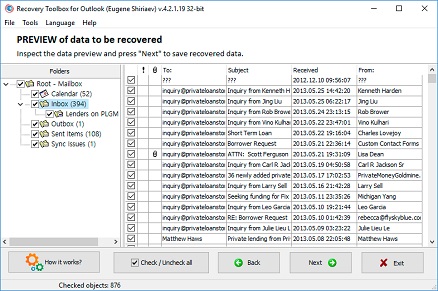
Start Microsoft Outlook Recovery Tool executable on your Windows PC;
Select a PST file on the first page of the software;
Select the preferred Recovery mode on the second page of the wizard;
Preview the recovered content from the damaged file free of charge;
Choose a destination folder on your hard drive to store the repaired data;
Select the Save as PST file mode on the next page of the recovery wizard;
Click Save to finalize the email restoration process.
To maximize data recovery, the software thoroughly analyzes the internal structure of the PST file. It scans critical elements such as B-trees, the file header, nodes, and MAPI properties tables. The algorithm verifies block integrity and filters out duplicates. Validated data blocks are then assembled into nodes, ensuring that only the most recent versions of items are processed. Objects (emails, attachments, subject lines, appointments, contacts, folders, etc.) are assembled from the nodes and checked for correctness. Older duplicate objects are deleted. At each stage, data is decrypted and, if necessary, decompressed. Recovery Toolbox for Outlook extracts data successfully even if the source file is partially encrypted or contains mixed data types.
How to Recover a Corrupted Microsoft Outlook PST File
Recovery Toolbox for Outlook is a software solution designed to restore email messages, contacts, calendar entries, attachments, and other mailbox items from damaged Microsoft Outlook data files. It processes damaged Personal Storage (.pst) and Offline (.ost) data files, extracting all accessible items to save them in a healthy format.
The application supports legacy ANSI-format PST files created by Microsoft Outlook 97 through Outlook XP, as well as modern Unicode PST files used by Outlook 2007 and later versions, including Outlook 2016, Outlook 2019, Outlook 2021, Outlook 2024, and Outlook for Microsoft 365. This makes the tool suitable for both older archive files and current Outlook mailboxes.
Recovery Toolbox for Outlook can also process damaged OST files created by Microsoft Exchange Server, Microsoft 365, and other Outlook account configurations. It can read password-protected PST and OST files, work with encrypted Outlook data files, and recover information even when the original Exchange Server is unavailable. This is especially useful after an Exchange Server failure, a mailbox migration problem, accidental profile deletion, or loss of access to the original mail server.
The software restores Outlook email messages in plain-text, HTML, and Rich Text Format (RTF). It can recover email attachments, embedded images, inline objects, attached messages, documents, contact cards, and other data stored inside Outlook items. Recovered content can then be saved into a new PST file or exported into separate files for further use.
Recovery Toolbox for Outlook can help when the built-in Microsoft Inbox Repair Tool (ScanPST.exe) fails to repair a damaged file completely. For example, it may be used when Outlook displays errors such as 0x8004010F: Outlook data file cannot be accessed, when a mailbox cannot be opened, or when a repaired PST file still contains missing folders, damaged messages, or unreadable items.
Unlike standard utilities, Recovery Toolbox for Outlook safely processes oversized databases. It bypasses the legacy 2 GB file size limitation by splitting the recovered mailbox into multiple user-defined destination files, supporting both ANSI and Unicode structures. When necessary, the recovered mailbox can be split into several PST files, with a maximum size selected by the user. This can make large recovered archives easier to open, transfer, back up, and manage in Microsoft Outlook.
The program supports 32-bit and 64-bit editions of Microsoft Outlook and has been tested on Windows versions from Windows 98 through Windows 11, as well as Windows Server editions from Windows Server 2003 through Windows Server 2022.
In addition to its repair functions, Recovery Toolbox for Outlook serves as an efficient data converter, allowing users to export mailbox folders into MSG or EML formats.
Recovery Toolbox for Outlook also includes free viewer functionality. The free PST Viewer and OST Viewer modes allow users to open and inspect the contents of Outlook data files before deciding whether recovery or export is required.
Microsoft Outlook Recovery tool
The Outlook Repair Tool helps to fix many errors detected in MS Outlook:
The file outlook.pst is not a personal folders file.
Errors have been detected in the file outlook.pst. Quit Outlook and all mail-enabled applications, and then use the Inbox repair tool (Scanpst.exe) to diagnose and repair errors in the file. For more information about the Inbox repair tool, see Help.
The Inbox Repair Tool doesn't recognize the file outlook.pst. No information can be recovered.
An unexpected error prevented access to this file. Use ScanDisk to check the disk for errors, and then try using the Inbox Repair tool again.
Inbox Repair Tool (Scanpst.exe) hangs endlessly and doesn't perform the repair.
The PST file fixed by Inbox Repair Tool (Scanpst) is empty or doesn't contain the desired items.
This Microsoft Office Outlook PST recovery tool is like a data rescue for lost mailboxes. How to recover an Outlook PST file? Just select damaged file on first page of MS Outlook recovery tool and press Next button. Later software reads, analyze and show data from the customer's file.
By clicking Download or Repair Online, you agree to the Terms of Service and EULA.
Recovery Toolbox for Outlook
How to recover Outlook mail data
Recovery Toolbox for Outlook uses Microsoft Outlook for creation of new PST files. The new version of the PST file with recovered data will be equal to the Microsoft Outlook version installed on the computer.
Recovery Toolbox for Outlook can repair corrupted PST files after the incorrect recovery of ScanPST.exe. Recovery Toolbox for Outlook can repair and convert OST files if ScanOST.exe recovery hasn't been successful.
What version of PST file will be after recovering?
To restore letters, contacts, meetings, reminders, and other things from the damaged Personal Storage - Personal Store Folder - of Outlook, you can use the last backup or return to the previous stable copy of the PST file, or try to use Recovery Toolbox for Outlook. With a very high probability, Recovery Toolbox for Outlook can restore an array of data from .pst files to their original state before they were damaged.
How to Restore Outlook
To test this statement, it is necessary to:
Download, install, and run the DEMO version of Recovery Toolbox for Outlook.
Select a damaged .pst file.
Run the analysis of the damaged PST file.
Review the contents of the .pst file on the preview page.
Select a folder on the disk for exporting recovered letters, contacts, appointments, reminders, and other data.
Choose a saving method like a .pst file
Save recovered objects - saving up to 5 objects per folder is available in the DEMO version.
How to Fix Outlook
If you need to fix an Outlook file that is corrupted for any reason, then the full version of Recovery Toolbox for Outlook will allow you to do this in a few simple steps. Outlook PST file repair occurs by copying the corrected data from the damaged .pst file to a new PST file on disk. The tool doesn't fix or modify the existing PST file. All recovered data transfers to a new PST file with preservation of the folder structure and properties of all objects.
Comparison of PST file repair tools and services: test results based on real data
Recovery Toolbox conducted extensive research into the quality of recovery of damaged Microsoft Outlook PST files. The study was based on a huge array of real user data uploaded by real users to the cloud-based online service https://outlook.recoverytoolbox.com/online/. Testers attempted to recover more than 1,000 real user PST files using various utilities and services. The files were not selected in any special way; there was no additional sampling or selection of source data.
Simply, more than 1,000 real user PST files with an average size of 10Gb+ were recovered using the following competing tools and services:
The product does not support the latest versions of Outlook
Online service Online.repair
~83%
$10 per 1 GB
There is a program for Windows: Outlook Repair Kit
Online service OnlineFileRepair.com
~41%
$5 per 1 GB
Built-in ScanPST recovery tool
~10%
-
Fixes minor file damage, freezes in 10-15% of cases and damages user files
DataNumen Outlook Repair
~25%
$199.95
There is a batch mode for processing large numbers of PST files
Notes:
The ScanPST tool modifies the source files. Therefore, be sure to back up the files before restoring them.
If the ScanPST tool freezes, the originally damaged PST file will be modified again. Not every program can recover a PST file after the ScanPST utility freezes.
The DataNumen Outlook Repair program has a well-implemented batch mode for file recovery.
A license for SecureRecovery® for Outlook costs the same as recovering one file.
Stellar Repair for Outlook has not been adapted to modern PST file formats for a long time.
Requirements:
Windows 98/Me/2000/XP/Vista/7/8/10/11 or Windows Server 2003/2008/2012/2016 and above
Microsoft Outlook 98, Microsoft Outlook 2000, Microsoft Outlook 2002, Microsoft Outlook 2003, Microsoft Outlook 2007, Microsoft Outlook 2010, Microsoft Outlook 2013, Microsoft Outlook 2016, Microsoft Outlook 2019, Microsoft Outlook 2021, Microsoft Outlook 2024 must be installed on the user's computer at the time of conversion (excluding Outlook for Office 365, Outlook for iOS and Outlook for MacOS).
Notes:
This product does not export contact groups
Screenshots:
Selecting the source .pst file you want to repair
Select work Mode
Reading (detecting and recovering) data from the selected .pst file
Specifying the path where to save the recovered data
Outlook PST and OST Errors That Recovery Toolbox for Outlook Can Help Resolve
Recovery Toolbox for Outlook is designed to recover data from damaged Microsoft Outlook PST and OST files when Outlook cannot open a mailbox, display folders, or access stored email data correctly. These problems can appear after file-system errors, an interrupted Outlook session, a failed disk operation, a damaged Exchange cache, an oversized legacy PST file, or an unsuccessful repair attempt with Microsoft Inbox Repair Tool (ScanPST.exe).
For example, the program can be used when Outlook reports that The file outlook.pst is not a personal folders file. This message usually means that Outlook cannot recognize the internal PST database structure. A related error is: Errors have been detected in the file outlook.pst. Quit Outlook and all mail-enabled applications, and then use the Inbox repair tool (Scanpst.exe) to diagnose and repair errors in the file. Although ScanPST.exe is Microsoft's built-in repair utility, it may not always be able to reconstruct severely damaged folders, messages, attachments, or index data.
Recovery Toolbox for Outlook can also be useful when the Inbox Repair Tool cannot process the file at all. Typical messages include The Inbox Repair Tool does not recognize the file outlook.pst. No information can be recovered and Inbox Repair Tool (Scanpst.exe) hangs endlessly and does not perform the repair. In these situations, the Outlook data file may contain structural corruption that prevents the standard repair utility from completing its analysis.
Some users encounter startup failures such as Cannot start Microsoft Office Outlook. Cannot open the Outlook window. The set of folders cannot be opened. Errors have been detected in the file [c:..\outlook.pst]. Outlook may also display the shorter error The set of folders cannot be opened or Unable to open your default e-mail folders. These messages generally indicate that Outlook cannot load the mailbox hierarchy, default folders, or data-store metadata from the PST or OST file. Recovery Toolbox for Outlook can scan the damaged file independently and extract accessible mailbox content into a new data file.
Cannot start Microsoft Office Outlook. Cannot open the Outlook window. The set of folders cannot be opened. Errors have been detected in the file [c:\..\outlook.pst]. Quit Outlook and all mail-enabled applications, and then use the Inbox repair tool (Scanpst.exe) to diagnose and repair errors in the file. For more information about the Inbox repair tool, see Help.
The software can help when a PST file was processed by ScanPST.exe, but the result is incomplete. For example, users may find that The PST file fixed by Inbox Repair Tool (Scanpst) is empty or does not contain the wanted items. This can happen when the built-in tool restores only the minimum file structure or moves damaged items into folders that are difficult to locate. Recovery Toolbox for Outlook is intended to recover emails, folders, contacts, calendar items, attachments, and embedded objects from the original damaged file rather than relying only on the repaired output.
Recovery Toolbox for Outlook can also be relevant when Outlook displays access and data-integrity errors, including Outlook.pst can not be accessed - 0x80040116, File Outlook.pst could not be accessed. Data error. Cyclic redundancy check, or The file Outlook.pst cannot be opened. A cyclic redundancy check, commonly shown as a CRC error, may indicate that the file was affected by disk-sector errors, a failing storage device, an interrupted copy operation, or corruption in the underlying file system.
Other common repair scenarios include messages such as Scanpst reports 'Fatal Error 80040818' when trying to repair the PST file and Errors have been detected in the file Outlook.pst. Close all mail enabled applications, and then use the Inbox Repair Tool. These errors suggest that the PST database requires repair, but they do not guarantee that Microsoft's utility will be able to restore all mailbox items. Recovery Toolbox for Outlook provides an alternative recovery workflow for extracting data from the affected PST or OST file.
The program can also be used when Outlook reports that FileName.pst file could not be opened. The file may not be compatible with this version of Outlook or it may be corrupted. This may occur when the file format, internal database headers, or Unicode/ANSI PST structure cannot be interpreted correctly by the installed Outlook version. It can also help with legacy Outlook storage limitations, including the error OL2000: Unable to use your personal folder file if it exceeds the 2 GB size limit. Oversized ANSI PST files may become unstable or inaccessible after approaching the historical 2 GB limit.
In some cases, the problem may be related to the storage device rather than Outlook itself. Windows or Outlook may show the message An unexpected error prevented access to this file. Use ScanDisk to check the disk for errors, and then try using the Inbox Repair tool again.Recovery Toolbox for Outlook can be used after the damaged file has been copied to a stable drive, helping recover mailbox data without modifying the original PST or OST file during the analysis stage.
The software can also assist when Outlook becomes unstable or terminates unexpectedly. For example, users may see Microsoft Outlook has encountered a problem and needs to close. We are sorry for the inconvenience. A damaged mailbox file can cause Outlook to crash while loading folders, synchronizing data, indexing messages, or opening a specific corrupted email item. Recovering the data into a new PST file can help isolate the damaged source file from the working Outlook profile.
Access-related messages can include Unable to display the folder. The file Outlook.pst could not be accessed. Access denied,Cannot expand the folder, and Unable to display the personal Outlook folder. These errors may be caused by incorrect file permissions, a locked PST file, a disconnected storage location, or corruption in folder-table records. Recovery Toolbox for Outlook can extract mailbox data into a new location where the recovered file can be opened with appropriate permissions.
The application can also be used when ScanPST.exe reports an operating-system-level error such as An unknown error prevented access to the file. Error 0x80070570: The file or directory is corrupted and unreadable. This error commonly indicates file-system corruption or a problem reading the physical media. Before attempting recovery, it is important to create a safe copy of the original PST or OST file whenever possible, especially if the drive may be failing.
Recovery Toolbox for Outlook can help recover mailbox content when Outlook reports synchronization and storage-limit errors, including Task 'Microsoft Exchange Server - Receiving' reported error (0x8004060C): 'Unknown Error 0x8004060C'. This error can appear when an Outlook data store reaches its size limit or cannot be updated correctly. The tool can extract accessible information from the affected PST or OST file and save it into a new mailbox file or export format.
Finally, the software may be helpful when Outlook displays Exchange-related messages such as Network problems are preventing connection to the Microsoft Exchange Server computer. Contact your system administrator if this condition persists. Although this message can indicate an actual network, server, authentication, or profile issue, it may also appear together with a damaged local OST cache. In that situation, Recovery Toolbox for Outlook can help recover locally stored mailbox data from the OST file, even when the original Exchange Server is unavailable or cannot be reached.
By clicking Download or Repair Online, you agree to the Terms of Service and EULA.
Recovery Toolbox for Outlook
Video:
Online help:
The use of Recovery Toolbox for Outlook (Download) for repairing corrupted pst files implies that you closely stick to the sequence of actions during data recovery and precisely follow the instructions. When you repair damaged .pst files, you have to go through several steps one by one:
Recovering lost data from Microsoft Outlook .pst files with Recovery Toolbox for Outlook
To select the source pst file, specify the path to this file in Recovery Toolbox for Outlook. To do it, use the button and select the file you need from the list of files/profiles or specify its location on the disk. If the current user has only one Profile all data from which is stored in one pst file, the path to this file will be automatically displayed the address field of the dialog box. Otherwise you will have to select the file pst you want to repair manually. If you have already repaired this file before, you can select the path to it from the list that will open if you click the button in the right part of the address field.
If you do not know the path to the .pst file you need to repair, use the built-in search of files on the disk available in Recovery Toolbox for Outlook. To use the built-in search, click the Search for .pst & .ost files button. After that specify the search area (select one of the disks) and specify the extension of files to search for (select .pst, .ost or *.* in the Search Files with extension list). The Stop Search button becomes available after you start searching. You can use it to stop searching for files at any moment when the search built into Recovery Toolbox for Outlook is in progress.
When the search is over, select one of the files from the list in the central part of the search panel and click the OK button. The path to selected file will be displayed in the address field of Recovery Toolbox for Outlook.
Notes:
If you are repairing a .pst file under Windows NT, 2000, XP, 2003, you will need rights to access system files and folders where Microsoft Outlook stores original .pst files.
Recovery mode - If you have a corrupted PST/OST file then use this mode to bring back to life as much content as possible
Converter mode - If you have a healthy OST file and you need to convert it into a new PST file or if you have a healthy PST/OST file and you want to extract data out of it into separate .msg/.eml/.vcf files then use converter mode.
Identifying and recovering data from a corrupted pst file will start right after you click the Yes button in the Do you wish to start recovery? dialog box that Recovery Toolbox for Outlook will show after you select the .pst file you want to repair and click the Next button.
Depending on the performance of your computer and the size of the .pst file being processed, the recovery process will take some time. After the data has been read, folders recovered from the corrupted .pst file and their contents will be available for viewing (the Folder List and the Items List respectively).
Notes:
you will be able to move on to the next recovery step (the Next button will become available), if the program finds more than one item in the source .pst file.
The third recovery step is giving Recovery Toolbox for Outlook the path where to save data successfully recovered in the previous step. To specify the path to save data to, you should either type it manually in the Folder for save field or use the
button. After you click this button, you will see a dialog box where you should select the folder to save the recovered data to. You can also use a path from the Folder for save drop-down list if you have already saved data before.
Notes:
The size of free space on the disk must be at least twice as much as the size of the .pst file you are repairing. The red color of the value in the Required free disk space field informs you that there is not enough space on the disk.
Recovery Toolbox for Outlook offers you two ways to save data recovered from the corrupted .pst file:
as one or several new .pst files;
as separate files with the *.msg, *.eml, *.vcf and *.txt extensions.
In the first case, these files can be later opened and used in Microsoft Outlook. In the second case, they can be imported into mail clients supporting these standards (most mail clients support these popular data formats).
If necessary, select the checkboxes in the left column of the Recovered e-mail list next to the messages you want to save.
Taking into account that Microsoft Outlook cannot export messages to *.eml files, Recovery Toolbox for Outlook can be used to move mail from this mail client to other mail clients supporting message files with the .eml extension. It is also possible to export and then import contacts and notes as .vcf and .txt files.
Notes:
It is possible to save the recovered data as pst files only if Microsoft Outlook 98 or later is installed on your computer.
A click on the Save button start the process of saving data to the disk. After all recovered data have been successfully saved to the disk as .pst files or as separate files with the eml, vcf and txt extensions, the program will show a detailed report about what has been done in the form of a separate statistics sheet. It will include: the path to the Source PST file, the number of Recovered Folders in the .pst file, the number of Recovered Items, the path to the new Saved PST file(s).
a). Opening the new .pst file in Microsoft Outlook.
If you want to use the new .pst files in your work with Microsoft Outlook, select the File item and then click:
Outlook Data File in Microsoft Outlook XP, Microsoft Outlook 2003;
Personal Folders File (.pst)... in Microsoft Outlook 2000;
Open Special Folder in earlier Microsoft Outlook versions.
Select the necessary file after that and confirm your choice.
b). Importing *.vcf and *.eml files.
Separate files are imported into Microsoft Outlook Express by dragging these *.eml files from Windows Explorer to the folder opened in the mail client. To do it, you should select all files with the *.eml extension that you want to import, capture any of the selected files with the left mouse button and drag the group of the selected files to the window with the folder opened in Outlook Express.
Unfortunately, it is impossible to import *.eml files into Microsoft Outlook folders in the same way because it will not be completely correct. To move separate *.eml files, we strongly recommend that you stick to the following sequence of actions:
1. Import separate *.eml files into Microsoft Outlook Express folders first. To do it:
simultaneously start Microsoft Outlook Express and Windows Explorer;
use Shift+arrows or Ctrl+left mouse button to select all necessary *.eml files;
capture the selected group of files with the left mouse button by clicking any of the selected files and holding down the button and drag these *.eml files to the Microsoft Outlook Express folder
Notes:
Create a new folder in Microsoft Outlook Express for importing *.eml files before that.
Start Microsoft Outlook and select the Import&Export item in the File menu of the main menu.
Select the Import Internet Mail and Addresses option and click the Next button.
Select the Outlook Express 4.x, 5 option, leave the Import Mail item selected and import files by clicking the Finish button.
2. Separate vcf files are imported into Windows Address Book in the following way:
select all files with the *.vcf extension that you want to import in Windows Explorer;
capture any of the selected files with the left mouse button and move the group of the selected files to the Windows Address Book window or to the Contacts folder opened in Microsoft Outlook.
VCF and EML files can also be imported into other mail clients and programs supporting these files.
An email with a registration code and instructions for activating this code will be sent to the user immediately after the payment confirmation.
An email with a registration code will be sent from several different mail servers to prevent messages from appearing in SPAM filters. Accordingly, a possible duplication of registration letters received in the user's mailbox.
To activate the registration code, you need to run the application in Windows under a user with Administrator rights.
The number of Personal, Business or Site licenses activated simultaneously must not exceed the number of purchased licenses.
We sell software via registration services PayPro Global and Noventiq. That is why not Recovery Toolbox, but the corresponding company will be specified in the payment documents.
The purchased registration key is valid for all 5.x versions of Recovery Toolbox for Outlook.
Payment Services:
PayPro Global (PayPro Global, Inc., 250 The East Mall street, Etobicoke, ON Canada, M9B 0A9) is the fastest growing eCommerce company that develops customized solutions to help software producers to easily and effectively sell software online. PayPro Global supports more than one hundred currencies, all major credit cards, and a wide variety of payment options. PayPro Global offers efficient customer support 24/7 and provides personal attention to customers having special requirements.
Noventiq online store for licensed software opened in 2004. Noventiq offers customers over 15,000 programs from 3,000 developers, provides fast delivery (electronic and physical), accepts 20 payment methods, and includes a cumulative discount system. Noventiq specialists provide customers with all the necessary advice for purchasing licensed software. Selling software is our profession!
Benefits of full version of Recovery Toolbox for Outlook
Upgrading to the full paid version of Recovery Toolbox for Outlook unlocks several key benefits compared to the free version, giving you a better chance of retrieving your essential emails, contacts, and other data from corrupt PST or OST files. Here's how the full version empowers you:
Data Recovery, Not Just Preview: The free version might only allow you to preview recoverable items from your corrupt Outlook data file. The full version grants the crucial ability to save the recovered data. This lets you import your emails, contacts, calendars, and other Outlook items into a usable format.
Unlimited Recovery Potential: The free version might limit the amount of data you can preview or the number of files you can analyze. Upgrading to the full version removes these restrictions. Without limitations, you can recover everything from emails and attachments to contacts and calendar entries from as many corrupt Outlook data files as needed.
Increased Confidence in Recovery: By saving the recovered data, you can assess the success of the recovery process before committing. This way, you can ensure the completeness and accuracy of your recovered information, giving you peace of mind.
Advanced Repair Capabilities: The full version might offer more advanced repair features than the free version. This could include the ability to handle more complex corruption issues or recover data from severely damaged files.
Additional Features (Depending on the Version): Depending on the specific version you purchase, the full version might offer additional features like the ability to export recovered data to various formats.
The full version of Recovery Toolbox for Outlook transforms it from a data loss diagnostic tool into a complete data recovery solution. It empowers you to identify recoverable data and restore it to a usable state within Outlook, giving you a much better chance of retrieving your critical information.
The free demo of Recovery Toolbox for Outlook can give you a glimmer of hope when faced with corrupt PST or OST files. Still, it lacks the functionality to recover your data truly. Upgrading to the full version unlocks the power to bring your emails, contacts, and other vital information back to life. Here's how the full version grants you significant advantages:
From Preview to Possession: The free demo's most significant limitation is the inability to save the recovered data. You can only see a preview of what might be salvageable. Upgrading grants the essential feature of saving the repaired Outlook data file fully. This lets you import your recovered emails, contacts, calendars, tasks, and notes into a usable format within your Outlook application.
Unlimited Recovery Potential: The free demo might restrict the amount of data you can preview or the number of files you can analyze. The full version unleashes the software's true potential. You can recover everything from simple emails and attachments to complex contacts with multiple details and even calendar entries, without limitations, from as many corrupt Outlook data files as you encounter.
Confidence in Recovered Data: The free demo can show you potentially recoverable data, but it doesn't guarantee a successful outcome. The full version lets you save the recovered data. This allows you to assess the quality and completeness of the recovery process before committing. You can then ensure you're getting your data back accurately and in its entirety, giving you peace of mind.
Advanced Repair Capabilities (Optional): Depending on the specific version you purchase, the full version might offer more advanced repair features than the free demo. This could include the ability to handle more complex file corruption issues or recover data from severely damaged files where the free demo might fall short.
The full version of Recovery Toolbox for Outlook goes beyond simply offering a glimpse of potentially recoverable data. It empowers you to take action and save the rescued information in a usable format within your Outlook application. This transformation from a diagnostic tool to a complete data recovery solution gives you a better chance of retrieving critical emails, contacts, and other irreplaceable information.
Here's a breakdown of the pros and cons of Recovery Toolbox for Outlook (full version) for Windows compared to an online Outlook corrupt file recovery service for all devices:
Recovery Toolbox for Outlook (Full Version)
Security and Control: You download and install the software on your Windows machine. This keeps your data private and confidential since it never gets uploaded to external servers. This can be a significant concern with online services.
Offline Functionality: Recovery Toolbox works even without an internet connection. This is crucial if your corrupt Outlook data file is substantial or your internet is unstable. Online services require an internet connection to function.
Potentially More Powerful Recovery: Dedicated software like Recovery Toolbox might offer more features and handle complex corruption issues better than a general online service.
Cost-Effective for Frequent Use: If you deal with corrupt Outlook files often, the one-time purchase of Recovery Toolbox can be more economical in the long run compared to per-file charges of online services.
Cons:
Limited to Windows: Recovery Toolbox is only available for Windows machines.
Requires Installation: Downloading and installing software can be an extra step compared to online services.
Online Outlook Corrupt File Recovery Service
Pros:
Convenience: Accessible from any device with a web browser and internet connection. No software downloads or installation is required.
Potentially Faster for Simple Repairs: Online services can sometimes provide a quicker solution for minor corruption issues.
May Be Affordable for Occasional Use: If you rarely encounter corrupt Outlook files, an online service might be more budget-friendly than buying dedicated software.
Cons:
Security Concerns: You upload your corrupt data file to the service's servers, raising security risks.
Reliance on the Internet: An internet connection is required throughout recovery.
Limited Control: You have less control over the recovery process and might be unable to see details about what's being recovered.
Potentially Higher Costs for Multiple Files: Per-file charges can add up quickly if you need to recover multiple corrupt Outlook data files.
In summary:
Choose Recovery Toolbox if you prioritize data security, control over the recovery process, need to work offline, handle complex file corruption, or expect to recover multiple files frequently.
Choose the online service for convenience, potentially faster turnaround for simple repairs, or if you only encounter occasional file corruption, price is a significant concern, and you are comfortable uploading your data to the cloud.
I recently used Recovery Toolbox for a data recovery situation, and I was extremely impressed with the results. The software was user-friendly and straightforward to use, making the entire process stress-free. The recovery was successful, and I was able to retrieve all of my important files without any issues. I highly recommend Recovery Toolbox to anyone who needs to recover lost or damaged data.
Due to the fact that my file contained confidential data, I had to use the services of this company to restore Outlookы. The program turned out to be quite simple and apart from clicking on the "Next" button, nothing was required, the whole process was automated, at the output I received a restored file. The only drawback is that technical support responds with a delay of 20-30 minutes.
A VERY useful tool which does exactly what it says on the tin. It is extremely simple to use, the interface is extremely obvious. What a fantastic FREE tool.
I'm using Microsoft Outlook 2024 on Windows 11. After a power outage, Windows booted up very slowly, Outlook 2024 took a long time to open, and then the Outlook window disappeared completely. I tried running Outlook as an administrator, but the program still says that the PST file cannot be opened. How can I recover my Outlook emails?
Answer:
The PST file may have been open for writing when the power went out. This could have corrupted the internal structure of the PST file: the index, the folder table, or the message records.
Open the corrupted PST file in Recovery Toolbox for Outlook. Wait for the scan of the corrupted file to finish, review the recovered emails, folders, contacts, calendar, and attachments, and then save the results to a new PST file. Connect the new PST file to Outlook 2024, leave the original corrupted file as is, and remove it from the email profile settings in Outlook 2024.
Question:
I use Microsoft Outlook 2016 on Windows 10. My local PST archive contains business emails spanning about eight years. The PST file is over 60 GB. Today, Outlook froze upon startup, and after restarting Windows, the archive disappeared from the left-hand folder pane. When I try to add the PST file again, Outlook goes into a Not Responding state. How can I restore the archive?
Answer:
A large PST file may become corrupted after an unexpected shutdown of Outlook, especially if Outlook was updating the archive index or saving new emails.
Do not compress or import a corrupted PST file. Copy it to another local folder. Unfortunately, the SCANPST.EXE utility does not work properly with files larger than 50 GB.
Open the copy of the PST file in Recovery Toolbox for Outlook. Check the recovered folder tree and emails. Save the data to a new PST file, then open the PST file in Microsoft Outlook 2016 and delete the old PST file from Outlook 2016.
It is recommended to set the maximum PST file size to 10-15 GB in the Recovery Toolbox for Outlook settings, as Outlook 2016-2024 does not handle files larger than 50 GB well.
Question:
I'm using Outlook for Microsoft 365 on Windows 11. After updating Office, my Microsoft 365 mailbox opens, but the old local PST archive displays the error Cannot open the set of folders. I need the old accounts and correspondence with clients from this PST. What should I do?
Answer:
The Outlook profile may be fixed, but the local PST file may have suffered damage to its folder structure or header after an update, crash, or improper shutdown.
Locate the PST file, copy it, and make sure it is not marked as read-only.
Next, open a copy of the PST file in Recovery Toolbox for Outlook. Review your old accounts and client folders in the preview, and save the recoverable data to a new PST file. After recovery, add the PST file to Outlook for Microsoft 365 via Account Settings > Data Files, and delete the old PST file from there.
Question:
I'm using Outlook 2019 on Windows 10. After my computer shut down unexpectedly, Outlook stopped opening my main PST file. I ran SCANPST.EXE; the program reported that the errors were fixed, but Outlook still says the data file is unavailable. How can I recover the PST file after running ScanPST?
Answer:
ScanPST can fix some structural errors, but the file may still contain corrupted emails, folders, or internal tables that Outlook cannot load.
Option 1: Make a fresh copy of the original PST and run ScanPST again on that copy. Sometimes it takes several passes with ScanPST. If the file opens, immediately export important folders to a new PST.
Option 2: Open a copy of the original corrupted PST file in Recovery Toolbox for Outlook. If the program can read the mailbox structure, check the emails in the preview and save them to a new PST file instead of repeatedly repairing the same file in ScanPST.
Question:
I'm using Outlook 2016 on Windows 10. The PST file opens, but several project folders that used to contain thousands of emails are now empty after Outlook crashed during archiving. The Outlook search function can't find these emails either. Is it possible to recover the missing messages?
Answer:
Outlook may have lost references to messages within the folder structure of the PST file. The emails themselves may still be in the file, but the folder index may have been corrupted.
Make a backup copy of the PST file. Run SCANPST.EXE on the backup copy. After the repair, check folders such as Lost and Found or Recovered Personal Folders. Also, make sure the emails aren't hidden by an Outlook view filter.
If recovery using SCANPST.EXE did not help, run Recovery Toolbox for Outlook. Scan a copy of the original PST file in Recovery Toolbox for Outlook. If the missing folders or emails are visible in the preview, save them to a new PST file and open the new PST file in Outlook.
Question:
I'm using Outlook 2024 on Windows 11. Outlook opens normally, but when I click on one specific folder inside the PST file, the program freezes and closes. The folder contains old invoices and PDF attachments. How can I recover just this folder?
Answer:
A single folder or group of emails may be corrupted, even if the rest of the PST file opens normally. Outlook may close when it attempts to display a corrupted email or a link to an attachment.
First, copy the PST file to a safe location. Run SCANPST.EXE on the copy. If Outlook can open the repaired copy, export the problematic folder to a new PST file. Do not manually drag and drop thousands of emails if Outlook continues to freeze.
If ScanPST didn't help, open the copy of the PST file in Recovery Toolbox for Outlook, select the problematic folder in the preview, and save the recovered emails and attachments to a new PST file. Then open the new PST file containing the data in Outlook 2024 and move the emails from the new PST file to the desired folder after clearing it first.
Question:
I switched from an old Windows 10 computer running Outlook 2016 to a new Windows 11 laptop running Outlook 2021. I manually copied the old Outlook.pst file, but Outlook 2021 says it's an invalid Outlook data file. The old computer is now barely working. How can I recover my emails?
Answer:
The PST file may have been copied while Outlook was open, may not have been copied completely, or may have been corrupted during the transfer from the old drive.
If possible, copy the PST file again from the old computer with Outlook completely closed.
If the file remains unreadable, open the copied PST file in Recovery Toolbox for Outlook. Check your old folders and emails in the preview. Save the recoverable data to a new PST file created during the recovery process, then open it in Outlook 2021.
Question:
I'm using Outlook for Microsoft 365 on Windows 11. After updating Windows 11 and restarting my computer, Outlook launched but displayed the error Outlook data file cannot be accessed for my local PST file. The file is visible in File Explorer, but Outlook can't connect to it. How can I fix this?
Answer:
The update may have changed the file's access permissions, interrupted Outlook while the PST was open, or revealed pre-existing corruption in the PST file.
Check the file's access permissions and remove the Read-only attribute if it's enabled. Copy the PST file to a local folder, such as Documents.
If the access permissions are correct but Outlook still won't open the PST file, scan a copy of the file using Recovery Toolbox for Outlook. Save the recovered content to a new PST file and open the new file in Outlook.
Question:
I'm using Outlook 2019 on Windows 10. Windows reported disk errors and then ran a startup repair. After that, the Outlook PST file stopped opening. I can still see the PST file in File Explorer, but Outlook says the file contains errors. What's the safest way to recover it?
Answer:
Bad sectors or file system errors can corrupt parts of a PST file. Outlook may be able to see the file name and size, but the internal data blocks may be corrupted.
Before taking any action, copy the PST file to a healthy drive.
Option 1: Run SCANPST.EXE only on the copy. If the recovered file opens, export important emails to a new PST file on a reliable drive.
Option 2: Copy the corrupted PST file to a healthy drive and scan it using Recovery Toolbox for Outlook. Save the recovered data to a new PST file on another stable storage device. Do not continue working with the problematic drive.
Question:
I'm using Outlook 2021 on Windows 11. My antivirus quarantined a suspicious attachment from an Outlook archive, and after that, Outlook started showing errors when opening the PST file. I need to recover my emails, but I don't want to restore the dangerous attachments. What should I do?
Answer:
The antivirus may have modified, blocked, or partially deleted content associated with the PST file. If Outlook was open at the time, the PST file's structure may have become corrupted.
Option 1: Save a backup copy of the original PST file. First, scan the PST file with your antivirus software. Then copy the file and run SCANPST.EXE on the copy. After recovery, delete any suspicious emails or attachments before using the file as usual.
Option 2: Open the copy of the PST file in Recovery Toolbox for Outlook, review the recovered folders, and save only the clean folders you need to a new PST file. Do not open or extract any suspicious attachments until they have been checked.
Question:
I'm using Outlook 2016 on Windows 10. My old PST archive is password-protected. Outlook asks for the password and accepts it, but then reports that the file cannot be opened. The archive contains old personal folders and contacts. How can I recover it?
Answer:
The password verification may succeed, but the file structure may still be corrupted afterward. The password does not protect the PST file from corruption.
Before recovery, make a backup of the PST file. Run a disk check on the drive where the PST file was stored. The hard drive may be failing, and data integrity may be compromised.
If the disk check did not help, open only the copy of the password-protected PST file in Recovery Toolbox for Outlook. If the email structure is readable, check the recovered folders and save them to a new PST file. Leave the original password-protected file unchanged and use only the recovered PST file.
Question:
I'm using Outlook for Microsoft 365 on Windows 11. I exported emails from my mailbox to a PST file, but Outlook closed in the middle of the export. Now the exported PST file exists, but Outlook says it can't open it. Is it possible to recover this incomplete PST file?
Answer:
The export process may have ended before Outlook had a chance to write the PST header, folder tree, or message indexes. The file may exist on the disk but be incomplete inside.
If the incomplete PST file contains unique data, scan a copy of it using Recovery Toolbox for Outlook. Check the readable folders and save the recoverable messages to a new PST file. Do not overwrite the incomplete file.
Question:
I'm using Outlook 2024 on Windows 11. When I launch Outlook, a message appears stating that errors have been detected in the PST file and that I need to close Outlook and use the Inbox Repair Tool. I've never used SCANPST.EXE before. What steps are safe to take?
Answer:
Outlook has detected inconsistencies in the PST file: corrupted indexes, folder references, or message entries.
Close Outlook completely. Locate the PST file path via Outlook Data Files settings or in Documents\Outlook Files. Make a copy of the PST file. Run SCANPST.EXE on the copy, allow it to create a backup, and restore the copied PST file in ScanPST.
If folders are still missing from the PST file after recovery or errors remain, scan the original copy of the PST file using Recovery Toolbox for Outlook. Review the data in the preview and save the contents to a new PST file, then add the new file to Outlook.
Question:
I'm using Outlook 2019 on Windows 10. My PST file was corrupted, so I ran a recovery. Outlook now opens the file, but my contacts and calendar events are missing, even though some of my mail folders are visible. How can I recover the missing Outlook items?
Answer:
Different types of Outlook items are stored in internal PST folders. The recovery may have restored emails but not fully recovered contacts, the calendar, tasks, or notes.
Check the recovered folders, such as Lost and Found. Also, check Account Settings > Data Files to make sure the missing items aren't in another PST file.
If changing the settings didn't help, open a copy of the original corrupted PST file in Recovery Toolbox for Outlook. Check whether contacts, calendar, tasks, and notes are displayed in the preview. Save the found items to a new PST file and connect it to Outlook. In the data visibility settings, specify that Contacts and Events should be displayed from both PST files.
Question:
I'm using Outlook 2021 on Windows 11. My PST file was stored on an external USB drive. The drive disconnected while Outlook was open, and now Outlook says the PST file is corrupted. How can I recover the file without making the situation worse?
Answer:
Outlook was likely reading or writing to the PST file when the USB drive was disconnected. This may have corrupted the PST file's structure.
Stop opening the PST file directly from the USB drive. First, copy the PST file to your internal hard drive. Launch Recovery Toolbox for Outlook.
Copy the corrupted PST to a stable local internal drive and scan it in Recovery Toolbox for Outlook. Save the recovered content to a new PST on the internal drive, then open the new PST in Outlook. Remove the PST file stored on the USB drive from your Outlook profile.
Question:
I'm using Outlook 2016 on Windows 10. After recovering the corrupted PST file, Outlook opens the archive, but the search function doesn't find many old emails. Is this still a PST recovery issue?
Answer:
This may be an Outlook indexing issue. If the emails are visible when you browse the folders manually, the search index may be corrupted, or Windows may not have had time to index the large file.
First, check whether the messages are visible when you manually browse the folders. If they are visible, rebuild the Outlook and Windows Search indexes. It's possible that the new, recovered PST file has been excluded from the search, or that it's too large and Windows Search hasn't had time to index it yet.
Question:
I'm using Outlook 2024 on Windows 11. I recreated my Outlook profile to fix a sign-in issue. After adding my old PST file, Outlook displayed the error when accessing the data file. The PST contains archived correspondence with clients. How can I recover it without damaging the original file?
Answer:
Recreating the Outlook profile may have exposed a pre-existing PST issue. The old profile may have been using cached settings, and the new profile was unable to load the corrupted PST structure.
Do not import the PST file directly. Make a backup copy.
Open the backup in Recovery Toolbox for Outlook. Check the archived correspondence with clients and save the recoverable folders to a new PST file. Add only the new PST file to the recreated Outlook profile.
Question:
I'm using Outlook 2019 on Windows 10. My computer went into sleep mode while Outlook was compressing the PST file. After waking up from sleep, Outlook reported errors in the file, and the file no longer opens. Is it possible to recover emails from the PST file?
Answer:
Compression alters the physical structure of the PST file. If the computer went to sleep or restarted during compression, the PST file may have been left in an incomplete state.
Before taking any action, make a copy of the PST file.
Scan a copy of the corrupted PST file using Recovery Toolbox for Outlook. Review the recovered folders and save the contents to a new PST file. Use the new PST file as your working archive.
Question:
I'm using Outlook for Microsoft 365 on Windows 11. I reinstalled Office and then tried to open an old PST backup from another drive. Outlook says the file contains errors and cannot be opened. The backup contains old contracts and client messages. How can I recover the file?
Answer:
The PST backup may have been corrupted before the reinstallation, copied from an unstable drive, or marked as read-only after being restored from backup storage.
Copy the PST backup to a local folder and make sure the file is not set to read-only. Run SCANPST.EXE on the backup. If the file opens, connect it as a data file instead of importing everything at once.
If Outlook still rejects the PST file, open the backup in Recovery Toolbox for Outlook. Check contracts, client folders, and attachments, then save the recoverable content to a clean PST file for Outlook for Microsoft 365.
Question:
I'm using Outlook 2021 on Windows 11. My PST file opens very slowly; Outlook shows Not Responding, and after a few minutes, the file disappears from the folder list. I'm afraid the file is corrupted. How can I recover it?
Answer:
The PST file may be too large, internally fragmented, or partially corrupted. Outlook may close it when it cannot reliably read the folder structure.
Close Outlook, copy the PST file, and check your available disk space. If the PST file is less than 50 GB, run SCANPST.EXE on the copy. If the file opens, move your important folders to a new, smaller PST file and save a backup copy.
If the PST file is larger than 50 GB or ScanPST was unable to recover it, scan the PST file using Recovery Toolbox for Outlook and save the recovered folders to a new PST file. If the archive is very large, first recover the most important folders, and then create several smaller PST archive files.
Question:
I'm using Outlook 2024 on Windows 11, and my PST archive was stored in a folder synced with OneDrive. After a OneDrive sync conflict, Outlook started reporting that the PST was corrupted or unavailable. Now there are two similar PST files with different dates. How can I restore the correct archive?
Answer:
PST files are similar to active databases. Cloud synchronization can cause a conflict if Outlook modifies the PST file while OneDrive is uploading or downloading it.
Stop syncing the folder containing the PST files. Copy all conflicting versions to a local folder that isn't synced. Run Recovery Toolbox for Outlook only on the copies and compare which recovered file has more folders and more recent emails. Instead of saving the PST file right away, you can compare the folder tree, email dates, and attachments in the Recovery Toolbox for Outlook preview for each file. Save the best recovery result to a new local PST file outside the folder synced with OneDrive.
Question:
I use Outlook 2019 on Windows 10 at work. My PST archive was stored on a corporate network folder. When my VPN session with the office was interrupted, Outlook froze, and now the same PST file sometimes opens and sometimes shows corruption errors. How can I recover it?
Answer:
Outlook requires stable access to the PST file. A network disconnection can interrupt read/write operations and leave the PST structure corrupted.
Before recovery, copy the PST from the network folder to a local drive, if corporate security policies allow it. Do not run Outlook with the network copy. Run Recovery Toolbox for Outlook on the local copy and verify the recovered PST locally.
Save the recovered data to a new local PST file, then discuss safer storage options for archives with your IT department before returning the PST file to the shared resource.
Question:
I'm using Outlook 2021 on Windows 11. After repairing a corrupted PST file in ScanPST, I can see many old emails, but the PDF and Excel attachments are missing from some messages or won't open. My laptop battery ran out while Outlook was open. Is it possible to recover the attachments?
Answer:
The email text and attachment data may be stored in different parts of the PST file. Recovery may restore the message but not all links to attachments.
Open a copy of the original corrupted PST file in Recovery Toolbox for Outlook and check the emails with attachments in the preview. If the attachments are found in a new separate folder named Recovered_files, save the data to a new PST file and test the attachments from the new PST file.
Question:
I'm using Outlook 2024 on Windows 11. I created a new Windows account and copied the Outlook PST from the old profile folder. Now Outlook says it can't access the data file. I've already tried running Outlook as an administrator, but that didn't help. How can I recover the archive?
Answer:
The PST file may still have old Windows permissions, a read-only attribute, or access restrictions associated with the old profile. The file may also have been corrupted if it was copied while Outlook was open.
Copy the PST file to the new user's Documents folder. Check the access permissions and remove the read-only attribute. Make a duplicate of the file and run Recovery Toolbox for Outlook on the duplicate. Save the recovered content to a new PST file associated with the new Windows profile.
Question:
I'm using Outlook 2019 on Windows 10. I cloned my old hard drive to a new SSD. Windows and Outlook now start up faster, but the old PST file won't open. The other files seem fine. How can I recover the PST file?
Answer:
During cloning, regular files may have copied normally, but the PST file may have been incomplete if the source disk had bad sectors or if Outlook wasn't completely closed.
Check whether the path to the PST file has changed and whether the file was copied in its entirety. Create a new copy of the file on the SSD.
If the PST file remains corrupted after cloning, scan the copy using Recovery Toolbox for Outlook and save the recovered data to a new PST file on the SSD. Do not touch the original HDD until you have verified the result.
Question:
I'm using Outlook 2024 on Windows 11. I created new Outlook rules that moved thousands of emails to folders in the PST archive. Outlook froze during the process, and now the PST file shows errors, and some of the folders created by the rules are missing. How can I recover the file?
Answer:
Bulk rule processing can write many messages to the PST file simultaneously. If Outlook freezes or closes during the transfer, some folders and indexes may remain incomplete.
Temporarily disable the rules. Copy the PST file and run Recovery Toolbox for Outlook on the copy.
Scan the PST copy using Recovery Toolbox for Outlook. Check the folders created by rules and save the recovered emails to a new PST file. Recreate or enable the rules only after the recovered archive has stabilized.
Question:
I'm using Outlook 2021 on Windows 11. I started compressing the PST file because it was too large, but the process was interrupted when my laptop restarted for updates. Now Outlook says the PST contains errors. Can compression damage a PST file, and how can I recover it?
Answer:
Compression rewrites parts of the PST file to reduce its size. If the process stops halfway through, the PST file may remain incomplete or corrupted.
Immediately copy the PST file to a safe location. Unfortunately, SCANPST.EXE won't help in this case because part of the file is compressed and part is not. This disrupts the logic of how ScanPST works.
Use Recovery Toolbox for Outlook to create a copy of the PST file. Save the recovered items to a new PST file and use the new file as a replacement for the original, rather than continuing to work with the corrupted PST file.
Question:
I'm using Outlook 2024 on Windows 11. After enabling ransomware protection and Controlled Folder Access, Outlook started reporting that it cannot access the PST archive. I'm not sure if the file is locked or corrupted. What should I check first?
Answer:
Windows security settings may have blocked Outlook from writing to the folder. If Outlook was interrupted while accessing the PST, the file may also have become corrupted.
Check your Windows Security settings, the file's access permissions, and whether Outlook is allowed to access this folder. Then copy the PST to a regular local folder and run SCANPST.EXE on the copy if Outlook still reports errors.
If access has been restored but Outlook still won't open the file, scan the copy using Recovery Toolbox for Outlook and save the recovered data to a new PST file in an authorized local folder.
Question:
I'm using Outlook 2016 with a 70 GB PST file on Windows 11. It takes a very long time to open my current PST file. How can I speed up Outlook's performance with this file?
Answer:
Outlook 2016, as well as 2019, 2021, and 2024, has difficulty opening PST files larger than 50 GB. Even upgrading to SSD drives and increasing RAM does not speed up Outlook.
You need to split the PST file into several smaller files, for example, 10 GB each. Launch Recovery Toolbox for Outlook and, in the Tools | Options settings, enable the Split into parts option. Set the size for the new PST files, for example, 10 GB.
Open the large PST file in Recovery Toolbox for Outlook, specify a folder to save the new PST files, and save the data to them.
Open all the new PST files in your Outlook profile.
Question:
My Outlook 2003, which contains my old correspondence, received emails from the mail server but did not display them. My Inbox folder stopped opening. I was sent a large file containing a graphic design project in Photoshop, and I really need it for my work.
Answer:
Outlook 97, 98, 2000, XP, and 2003 have a 2GB limit on PST file size. Once the file size exceeds 2GB, you will not be able to view the data in Outlook.
These older ANSI-formatted files are best restored on computers running Outlook 2007 or later, which support large PST files exceeding 2 GB.
Open the large ANSI PST file in Recovery Toolbox for Outlook, specify a folder to save the PST file to, and save the data. Open the PST file in Outlook 2007 or later.
If you don't have a recent version of Outlook and are forced to use the older ANSI format, you'll need to set the maximum size for new PST files in Recovery Toolbox for Outlook, for example, 1 GB. In the Recovery Toolbox for Outlook settings, under the main menu Tools | Options, enable the Split into parts option. Set the size for new PST files, for example, 1 GB.
Open all new PST files in your Outlook profile.
Question:
An encryption virus has blocked all my work by encrypting all the files on my laptop. I can see my PST files on the laptop, but I can't open them. Even transferring the files to another laptop didn't help. Is it possible to recover my huge files containing 7 years' worth of work?
Answer:
Usually, if a file is very large, the virus doesn't encrypt it completely. The beginning and end of the file will be encrypted, and some blocks may be swapped with each other. The larger the file itself, the more blocks inside it will remain unencrypted.
Recovery Toolbox for Outlook can help recover data from the unencrypted blocks within the file and save it to a new PST file. Unfortunately, some data will be lost. The folder structure may be lost, and all emails may be saved in a single folder. User-defined data types and data settings are very likely to be lost, as they are stored at the end of the PST file.
The larger the encrypted PST file, the more data can be recovered from it.
Question:
Why is the size of a converted PST file smaller than the size of the original OST file?
Answer:
Our engineers have analyzed the content of OST (source) and PST (destination) files. The analysis revealed the types of data that are not carried over to the PST file after OST file conversion:
old versions of messages, contacts, files and other objects
removed objects
blocks of data from earlier versions of messages, contacts, files and other objects. It is impossible to use these blocks to fully recreate the original object, which is why they can be treated as junk.
In other words, when you remove or modify a message, contact, reminder or meeting, the object is only marked as removed, but is not removed physically and remains in the OST file. The new version of the object is written to a newly allocated space, but the old version remains in the OST file as well.
If Outlook is in active use, the size of the OST file can grow quite significantly, while the actual size of data in the file remains the same.
In order to optimize disk space consumption and remove old elements, you need to configure the AutoArchive feature in Microsoft Outlook.
Note: it is recommended to backtrack the changed options after the export of the recovered data in Microsoft Excel has been completed.
search for and reading of old versions of documents is used by attackers for stealing users' confidential information;
search for and reading of deleted and old versions of documents is used by police authorities to collect compromising information (Forensic Mode);
Recovery Toolbox for Outlook enables the user to search for data deleted from an OST/PST file and save it to the disk.
Question:
How do you convert a large OST file (over 4 GB) to a Microsoft Outlook PST file?
Answer:
When converting large OST files (4 GB and above), you will have to use a 64-bit computer system. All program components required for converting OST to PST must be 64-bit. These include:
Microsoft Outlook 64-bit
Microsoft Windows 64-bit
Recovery Toolbox for Outlook versions 4.0 and above
This allows you to bypass the limitations on the RAM that can be used by each component and convert OST files of virtually any size.
Converting huge OST files to PST files
Once all necessary components have been installed, run Recovery Toolbox for Outlook and perform the following actions:
choose the OST file you need to convert on the program's first screen
choose Convert on next page of Conversion Wizard
choose the emails, contacts, and other information you want to transfer from the OST to the PST file
choose the option to save as a PST file
type or select a folder to use to save the data on the disk
The process of reading the OST file and then exporting it to PST takes a significant amount of time. The time it takes to convert OST to PST depends on your computer's performance, particularly the speed of your disk subsystem.
Note: When you install Microsoft Office or Microsoft Outlook, the 32-bit version is installed by default. To install Microsoft Outlook 64-bit, read the following article: How to Install Microsoft Outlook 64-bit?
Question:
How to repair a large PST File with Microsoft Outlook Data?
Answer:
To recover a very large Microsoft Outlook PST file (more than 4 GB), you'll need to have Recovery Toolbox for Outlook installed on your computer, as well as the following:
Microsoft Outlook 64-bit
Microsoft Windows 64-bit
If this software is installed, Recovery Toolbox for Outlook won't be limited to the size of operating data that 32-bit systems have. The program will be able to completely restore and save the data in a new PST file when working with the 64-bit versions of Microsoft Outlook and Microsoft Windows. If Microsoft Outlook 32-bit is installed on the computer, Recovery Toolbox for Outlook will encounter a limitation due to the amount of RAM that can be used in the restoration of data.
If you have the installation disc or distribution kit, you can install Microsoft Outlook 64-bit along with the 32-bit version of Microsoft Outlook. You'll find instructions for the installation of Microsoft Outlook 64-bit here: How to Install Microsoft Outlook 64-bit?.
Question:
How to Install Microsoft Outlook 64-bit?
Answer:
Instructions on how to install the 64-bit version of Microsoft Outlook
To install Microsoft Outlook 64-bit, be sure you have the 64-bit version of Microsoft Windows installed
Open the Microsoft Outlook install disc in Windows Explorer
Open the Office folder
Run the program setup64.exe
Follow the installation instructions
Note: When Microsoft Outlook is installed, the 32-bit version is installed by default.
Question:
Recovery Toolbox for Outlook has stopped working under Windows 7. Please suggest me a solution
Answer:
Please try the solution which is offered by Microsoft:
Open the Start menu and click Control Panel.
Browse to System and Security then click on System icon.
In the left panel click on link Advanced system settings.
You should now see the System Properties Window. Please select Advanced tab. You should see three sections. The top section is labeled Performance and has a Settings button. Click this button.
Select the Data Execution Prevention tab.
Select the option which reads Turn on DEP for all programs and services except those I select.
Use the Add button to locate the executable file for the application executable file RecoveryToolboxForOutlook.exe you were trying to start when you received the error, and click Open to add it to your exceptions list.
Click Apply or OK to commit your changes.
Question:
How to view Contacts from new PST file of Outlook 2003/2007?
Answer:
Can't view Contacts from new PST file in Microsoft Outlook 2003/2007. To view Contacts need to:
Turn on Navigate Pane in Microsoft Outlook by press Alt-F1 or select from main menu View | Navigate Pane.
Open new PST file from main menu File | Open | Outlook Data file...
Check item Contacts from Navigate Pane.
Select item Calendar in Personal Folders.
Question:
How to import VCF files to Microsoft Outlook 2003?
Answer:
Afrer WAB recovery you got the set of Virtual Cards (vcf) files. You can use the Import function of MS Outlook to import the vcf files. To import them to MS Office Outlook you should:
Run the MS Outlook
Select menu File - Import and Export...
Choose Import a VCARD file (.vcf) item and press Next
Select VCARD files to import and press OK.
OR
Run the Outlook
Open and select the Contacts folder
Select .vcf file in Windows Explorer and drag-and-drop them to the Microsoft Outlook folder
Question:
After it recovered my 45,000 emails, it lost track of which ones had been unread and marked all message as read. How can I fix that?
Answer:
Our software was developed for data recovery only. It can't recover records, statuses, etc.
Question:
I permanently deleted the .PST file from my hard drive. How can I recover it with your software?
Answer:
Our software can recover data only from an existing file. You can try to restore your file with some unerasing software and then recover it with Recovery Toolbox for Outlook.
Question:
If you do not have enough space on your primary hard drive, does Recovery Toolbox for Outlook allow you to specify an alternate drive to save its output files to?
Answer:
Yes, but it needs space for temporary files. Free disk space should be 2 times greater than the size of the original .pst file being recovered.
Question:
The program does not work. What am I doing wrong? I'm trying to recover a file. When I select "Save as PST file", it tries to make a copy of the original file, but when it is done, it displays the following error message: Invalid class string or Outlook application needs to be installed on the computer.
Answer:
Make sure you close Outlook before you start Recovery Toolbox for Outlook. Try to download the newer version of our software and install it.
In some cases, you have to reinstall Microsoft Outlook and Recovery Toolbox for Outlook because some components that are in use must be updated, but they cannot be released without reinstallation. Try to recover your data to separate files, it may help. Make sure you have enough free space on your storage drive to save recovered data. Do not try to save the file with results under the same name as that of the damaged file.
Try to recover data again.
Question:
If it does not help, what can I do next?
Answer:
You should send the log file of the program to our support service. The log file is located in the same folder where Recovery Toolbox for Oulook is installed (for example, D:\Program Files\Recovery Toolbox for Outlook\Err.log).
Also, let us know the version of your OS (Operating System) and Outlook.
Question:
I can't send the log file because it is too large (42 MB)
Answer:
You can compress the log file using the WinRar program (https://rarlab.com). It will become smaller after that.
Question:
How to make a new PST file the default file in Outlook?
Answer:
You should:
Open Start | Settings | Control Panel | Mail
Use the Delivery tab to select the corresponding PST file in the Deliver new mail to the following location: combo box and confirm moving the service folders (if necessary).
Thus, the new .pst file will be the file used in Outlook by default.
Question:
How to import messages saved as .eml files into Microsoft Outlook?
Answer:
Messages saved as .eml files are imported into Microsoft Outlook in several steps. You should:
Import .eml files into Outlook Express folders. To do it, you should open Outlook Express and Windows Explorer at the same time.
Select .eml files in Windows Explorer using the Shift + arrow keys or the Ctrl key + the left mouse button.
Use your mouse to drag the selected .eml files to the Outlook Express folder.
Note: it is recommended to create a new folder in Outlook Express to import messages into.
Open Microsoft Outlook 2000 and select the File | Import & Export item in the main menu of the program.
Select the Import Internet Mail and Addresses item and click the Next button
Select the Outlook Express 4.x, 5 item from the list, leave the Import Mail checkbox selected and click the Finish button
Question:
I've saved calendar by use Recovery Toolbox for Outlook program. The saved appointments is not available in Microsoft Outlook
Answer:
You should:
Open the PST file in Microsoft Outlook
Open the Calendar tab
Select the option to display the calendar of Personal Folder
Now the calendar from saved PST file is also displayed.
Notes: Users of Microsoft Outlook earlier versions should:
Open a new PST (Personal Store Folder) file in Microsoft Outlook.
Expand the folders of the new PST file in the left panel and click the Calendar folder.
Saved events from the new PST file will be displayed in the right panel.
Question:
I've saved contacts by use Recovery Toolbox for Outlook program. The saved contacts is not available in Microsoft Outlook
Answer:
You should:
Open the PST file in Microsoft Outlook
Open the Contacts tab
Select the option to display the contacts of Personal Folder
Now the contacts from saved PST file is also displayed.
Notes: Users of Microsoft Outlook earlier versions should:
Open a new PST (Personal Store Folder) file in Microsoft Outlook.
Expand the folders of the new PST file in the left panel and click the Contacts folder.
Saved events from the new PST file will be displayed in the right panel.
Question:
I ran your software to recover an OST (PST) file which is 2.4 gigs. After processing the file for long time the resulting PST file was pretty much empty. What am I doing wrong? Please advise
Answer:
You should:
Reboot your computer.
Disable your antivirus, it can block access to the Outlook data for our program.
Don't run the Outlook during and before recovery. If you choose to save data to new PST files, Outlook will start in hidden mode automatically.
Try to make the recovery to separate files, not to PST.
If you have another computer, please try to recover this file on it.
Send to our technical support your original file for a recovery if my suggestions can't help.
You can create multi-volume archive from the orignal OST/PST file using WinRar program (https://rarlab.com). It is free trial. The size of each volume must be ~30-50Mb. And upload all files on www.dropbox.com service and send us the links to the all files.
Question:
When I import data into Outlook, I get an error message: This Personal Folders file (pst) is already in use with this profile. How to fix this error?
Answer:
This error occurs:
when Microsoft Outlook tries to open several Personal Store Folders that use one PST file
or if the Personal Store Folder is registered in Microsoft Outlook, but the original PST file does not exist on the disk or if the path to it is incorrect
To solve the problem, you should:
Close Recovery Toolbox for Outlook and Microsoft Outlook
Restart the computer
Start Microsoft Outlook. Ignore the message This Personal Folders file (pst) is already in use with this profile while restarting Microsoft Outlook.
Close all PST files Personal Store Folders being used, except for the main Personal Store Folder in the left panel of Microsoft Outlook. To do it, you should right-click the Personal Store Folder item and select the Close Personal Store Folder item in the context menu.
Close Microsoft Outlook
Open Microsoft Outlook again. If the error message This Personal Folders file (pst) is already in use with this profile appears again, the path to the main Personal Store Folder is incorrect or the PST does not exist on the disk. To fix this error, you should:
Find the source PST files on the disk. The best way to do it is to use the Microsoft Windows search feature (click Start | Search | For Files and Folders...), select All files and folders (for Windows XP) and then search for .pst files on the computer.
Set the correct path to the file and its name in the properties of the main Personal Store Folder (right-click the Personal Store Folder item and select the Properties item in the context menu).
Question:
I'm trying to recover a Microsoft Outlook data file. Your tool initially finds 40,456 objects, but the recovered pst file contains 40,337 objects according to the program report. What happened to the missing 119 objects?
Answer:
Microsoft Outlook data files contain main objects ( messages, contacts, notes, reminders, attached files and others) and service objects that are not shown to the user. While writing the recovered data to the new .pst file, the program does not write some service objects because there is no need to do it.
Question:
Whenever I try to import that recovered data, I get a message saying the pst file is not compatible with this version
Answer:
You performed the recovery operation at another computer or where another version of Outlook is installed. Our software uses Outlook components to compile the structure of a new PST file(s). So the recovered PST file is compatible with the version of Outlook that is installed on the system where the PST file was recovered.
Question:
Can your software recover old Outlook files that were on an old hard drive that crashed?
Answer:
Cases differ. Our software requires that the damaged file is fully readable so if you can copy the file to a normal, not crashed hard drive, our software will probably help you. Please download our software and try it for free. If it can help in your case, you can purchase it to disable the trial limitations.
Question:
How to repair Exchange Server mailboxes?
Answer:
Repairing mailboxes after the corruption of the Exchange Server database file.
If the Exchange Server database file gets damaged, the server will still have *.edb files with users' emails. There will also be .ost files on users' computers containing the personal data of each user.
OST files can be quickly and easily converted to PST files using Recovery Toolbox for Outlook.
You can try recovering .edb files using Recovery Toolbox for Exchange Server. This tool converts individual mailboxes to .pst files.
We recommend trying both recovery methods to recover as much data as possible.
Question:
How to convert ost to pst file?
Answer:
This OST-to-PST converter is an easy-to-use tool that operates like a wizard. With it, you can convert an .ost file to the .pst file format in a few simple steps. No special know-how is needed in order to use the Recovery Toolbox for Outlook OST-to-PST converter.
Microsoft doesn't currently offer a special Outlook OST-to-PST converter. All OST2PST converters have been designed by ISVs. Recovery Toolbox for Outlook, however, has a demo mode that lets you convert five objects per folder.
Question:
What versions and types of .ost files can be converted to .pst files?
Answer:
Recovery Toolbox for Outlook can read .ost files any versions of Microsoft Exchange Server, any version of Microsoft Outlook (32- or 64-bit, ANSI or UNICODE). Software can read and convert .ost files with any size of file.
Question:
Why size of result pst file smaller than size of source .ost file in several times?
Answer:
The size of the converted .pst file shows the actual size of information stored in the ost file. If you do not make archives and do not start Cleanup Tool regularly for the original Offline Storage Folders, then the .ost file size is only growing. As a result, only 5-10% of the file can be used for a real user's data.
Question:
What version of pst file will be after OST2PST conversion?
Answer:
For the use of OST-to-PST conversion on a computer running Microsoft Outlook, the .pst file version will be the same as that installed in Microsoft Outlook. If the computer has Microsoft Outlook 2007 or higher installed, the size of the resulting .pst file can exceed 2Gb. If you use MS Outlook 98-2003, the size of the resulting file will be limited to 2Gb. In this case, Recovery Toolbox for Outlook will create several .pst files in which to store all the data from the source .ost file.
Question:
How export data from .ost file to other Email client software
Answer:
Recovery Toolbox for Outlook exports messages, contacts, appointments and other data from .ost files as MSG files. The software converts and saves all data from .ost files to the .msg file format. Later, the user can drag and drop or import the saved *.msg files in any of the popular client software programs, including Lotus Notes, Microsoft Live, The Bat, Eudora, Incredimail, Mozilla Thunderbird, etc.
Question:
How do you import .ost files in Outlook?
Answer:
Microsoft Outlook has no function with which to import data from .ost files. To open an .ost file in Outlook, the Exchange Server and Windows Domain Controller must be working and available for user authentication in both of the respective services. Only after that is it possible to transfer the contents of an .ost file that is open in Outlook to a .pst file that is also open in Outlook.
If the Exchange Server or Windows Domain Controller isn't accessible or doesn't work, or if the user can't be authenticated, access to the data will be denied and Outlook won't open the .ost file.
Question:
How do you import data from an .ost file in Outlook when the Exchange Server or Windows Domain Controller isn't accessible?
Answer:
The original .ost file must be converted to a pst file using Recovery Toolbox for Outlook and then opened in Outlook. Conversion from OST to PST using Recovery Toolbox for Outlook doesn't require the availability of Exchange Server or Windows Domain Controller.
Question:
How to fix the issue: 0x8004010F: Outlook data file cannot be accessed
Answer:
To correct the following issue 8004010F when using POP3/SMTP accounts in Microsoft Outlook, do the following:
Last, you should replace the damaged file to a recovered one or merely add the recovered file to the list of data files in Outlook.
Question:
Can I repair Outlook 2019 .PST file?
Answer:
Follow the link https://outlook.recoverytoolbox.com/repair-outlook/ and download Recovery Toolbox for Outlook, the application is compatible with all versions of Outlook, including our new Outlook 2019. Then, install it and follow the instruction:
Start Recovery Toolbox for Outlook.
Choose the needed file of PST format.
Choose Recovery mode.
Start the analysis of the damaged file and wait until it is finished.
Preview the contents of the repaired file.
Choose a folder to save the repaired file.
Choose Save as PST file.
Click the Save button.
After a successful repair, you should properly connect a file of PST format to Outlook 2019:
Open Outlook 2019 and choose File | Info.
Click Account settings.
Choose Account settings in the popup menu.
Choose the following tab Data files.
Choose a data file from the list below.
Click Delete if the file is present.
Click Add and provide the correct PST file path.
Open Microsoft Outlook, try to send and receive your email.
Conclusion
If you'd like to update to Microsoft Outlook 2019 and you have already an older version of Outlook, for example, 2016/2013/2010/2007, and the like, I would advise the following:
Make a backup copy of Outlook data files (files of .pst and/or .ost format)
Remove Microsoft Office completely
Make a new clean install of Microsoft Outlook to another folder. For this purpose, use the option of advanced installation and enter the installation path.
Open the list of Outlook data files and add a previously saved PST file of the previous application version.
Question:
What recovery algorithm is used in the utility?
Answer:
Recovery Toolbox for Outlook reads the damaged file, identifies blocks with data, and verifies the integrity of the data blocks. Next, objects (letters, files, contacts, etc.) are assembled from the blocks in several stages. The objects are checked for integrity and correctness. The recovery algorithm consists of multiple readings, analyses, and checks based on user data signatures.
Question:
What level of detail is available in the logs in case of failure?
Answer:
All information about the operation of Recovery Toolbox for Outlook is saved in as much detail as possible in the err.log log file. Based on this file, if you send it to the developers' technical support, you can identify problems during data recovery.
Question:
Is it possible to automatically start the conversion of OST to PST from the command line?
Answer:
No.
Question:
Is there a Script API for automation using PowerShell?
Answer:
No.
Question:
How is file integrity checked after recovery?
Answer:
Yes. Each object and data block is checked for integrity and correctness. Incomplete data is saved in separate folders with appropriate names.
Question:
Is GPU acceleration supported when scanning large files?
Answer:
No.
Question:
What are the restrictions on folder nesting depth?
Answer:
There are no restrictions on folder nesting.
Question:
What happens to email metadata (read status, categories)?
Answer:
All user metadata and properties of all objects are transferred to the new PST file as is, i.e., as accurately and completely as possible. There have been cases where this metadata was lost because the PST file was truncated.
Question:
Can I choose the date/time format when exporting?
Answer:
The date/time format always corresponds to the local Windows settings.
Question:
Are there versions of the utility for Linux or macOS?
Answer:
There are no versions for Linux or macOS, but there is a universal online service https://outlook.recoverytoolbox.com/online/ that is suitable for all devices and all operating systems.
Question:
Can I export directly to Office 365 or Gmail?
Answer:
Recovered Outlook data is exported to PST files, which can then be opened in Office 365 or Gmail.
Question:
What is the maximum file size for multi-volume recording?
Answer:
There is no limit to the file size for multi-volume recording. However, the multi-volume recording feature is designed for recording large amounts of data on computers with older versions of Outlook (versions 97-2003) where the file size is limited to 2 GB. Thus, by splitting large files into multiple volumes, you can save all recovered data even on older computers with older versions of Microsoft Outlook.
Question:
How does the utility work with Unicode and ANSI PST files?
Answer:
Special algorithms determine the version of the PST file: Unicode or ANSI. Based on this, data is read from the PST file.
Note: Very often, after ScanPST utility failures, you have to recover PST files in which some of the data is recorded in Unicode format and some in ANSI format. Recovery Toolbox for Outlook recovers PST files even if the ScanPST utility has repeatedly recorded data incorrectly in different formats.
Question:
How compatible is the utility with VirtualBox or VMware?
Answer:
Recovery Toolbox for Outlook is fully compatible with VirtualBox and VMware, as confirmed by numerous tests.
Question:
What happens when restoring PST to a network folder/NAS?
Answer:
Recovery Toolbox for Outlook works with network drives/NAS if they are accessible and file read permissions are granted.
Question:
Can categories and follow-up flags be recovered?
Answer:
Yes, all user settings, flags, and categories are transferred to the recovered file.
Question:
Is there version control for the recovered PST?
Answer:
The recovered PST file is created via Microsoft Outlook COM/OLE interfaces. The PST file version corresponds to the version of Microsoft Outlook installed locally.
Question:
Is it possible to filter by date or message size during recovery?
Answer:
The user can manually select the folders and objects they want to export to the new PST file. To select the data to be exported, select these folders and/or emails/contacts/files on the preview page of the recovered data.
Question:
Is there a mobile app or online dashboard?
Answer:
There is a universal online service, https://outlook.recoverytoolbox.com/online/, which is suitable for recovering PST files on all mobile devices and operating systems (iOS, Android, macOS, etc.).
Question:
Is there integration with cloud storage (OneDrive, Dropbox)?
Answer:
Integration at the disk subsystem level works and has been tested. The user must connect the cloud storage as a network drive.
Resources:
Additional information, sources and resources for a PST files repairing
Recovery Toolbox for Outlook - Technical Specifications
Software Limitations
Recovery Toolbox for Outlook read Outlook PST File Items: Emails, Contacts, Calendar, Attachments, Notes, Task, Journal Items without any limitation.
System Specifications
Hard Disk Space - 100-400 MB of free hard disk space required
RAM - 200-700 MB is recommended
Processor - Intel® Core™ 2 Duo @ 2.40GHz
Operating System
Microsoft Windows 11 (32 or 64 bit)Windows 10Windows 8Windows 7 (32 or 64 bit)Windows XPWindows 2000Windows Server 2022Windows Server 2019Windows Server 2016Windows Server 2012 R2Windows Server 2008
Application Pre-Requisites
No additional requirements
Supported Outlook versions
Microsoft Outlook 2000200320072010201320162019202120222024Outlook for Microsoft 365
Delivery
Product delivery is automatic. The electronic key for activating the License is available on the final purchase page. The electronic key is also delivered via email.
Microsoft Outlook expert in storing and displaying data from PST and OST files, specialist in converting and recovering data from PST/OST files with over 20 years of experience.
Victor Bobrov is a senior data recovery specialist with 15+ years of experience in Microsoft Exchange Architecture and PST structure forensics.
Trust, author expertise and data-safety information
This page is maintained by Recovery Toolbox / File Master LLC and is connected to the author profile, company profile, legal pages and support resources so users and search engines can verify who is responsible for the PST Viewer content.
Expert author and reviewer
Victor G. Bobrov
Chief Software Engineer and File Recovery Expert
Victor Bobrov is listed as the author and reviewer of this Outlook Repair guide and is connected in structured data as the creator of the Recovery Toolbox for Outlook Repair Tool.
For confidential mail archives, use the offline desktop Outlook Repair Tool so files stay on your computer.
Before opening a damaged PST file, work with a copy and keep the original file unchanged.
The Online Outlook Repair Service is provided for convenience when installation is not possible.
Links to EULA, privacy policy and support are kept visible for transparency.
Customer's reviews and ratings:
Diana Saavedra 10-12-2026
Thanks to the program I can recover my email history
Garegin 10-10-2026
Amazing Proto Class program
ERENERTAN 09-10-2026
Thank you. This application is very useful.
christy 08-02-2026
first time using this, hopefully it helps recover my acadmic materials...
jhona 05-25-2026
good app
Mj 05-21-2026
Amazing
nuria 05-17-2026
He saved my life
sir Hightower 03-17-2026
The program works quickly and very well, although it did fail with one folder (but other programs did too). Overall, 10/10.
eva 01-31-2026
good tool
GUILLERMO 01-28-2026
Impresionante, no imaginé tal eficiencia, muchas gracias.
#NationofFred 01-20-2026
These guys are great. I was able to recover the 5 most recent emails from each and every sub folder. This is the free version. It's a life (email) saver. Thank you.
Oscarin Guti 12-30-2025
80 años. Retirado. RECOVERY,TOOLBOX, facilísimo de usar. Fabuloso.
ASHU 12-17-2025
This is gold.. loved the service
Klaus Gottfried 12-15-2025
I accidentally deleted files in my email inbox, and I was able to recover many of the deleted files using your tool.
ROX 11-19-2025
:=)
Henk J. 09-25-2025
I lost the files after a computer crash. Had to re-install windows. I want to recover all pst, and ost. Files.
gehan 09-21-2025
canot tell 100000000 thanks
VALLADE 09-01-2025
Repairing a damaged PST file. I was able to recover most of my emails.
anu 08-24-2025
nice
Alvaro 08-18-2025
Excelente programa, mis felicitaciones.
Navin 06-30-2025
super recovery, very fast and did a perfect job, can recommend to any one looking for recovery software.
didi 06-30-2025
100% ist Gut!
Dietmar Kroschel 06-23-2025
Hello Recovery Toolbox team, thank you very much for your support. One of my PCs froze, forcing me to do a hard reset. At the time, Outlook was open. After the restart, Outlook could no longer find the PST. Renaming the PST wasn't possible, even in safe mode. Apparently, a program was accessing the PST even though Outlook was closed on all computers. A Google search led me to your tool. After the repair (2-3 hours), I was able to save the PST under a new name and use it again. Thanks again. Best regards, Dietmar Kroschel
John Payne 05-12-2025
I needed to access OST files on an old hard disk. As I don't use Outlook as email client, I needed to find a tool. I was not recovering from corrupted data. Thanks for making the tool👍
MaDestro 05-11-2025
Feels good! i like it! thnx for devs
aamir 04-24-2025
its workilng very well in 2025 thank you
Сергей Д 04-04-2025
Great program, really helped me out!
Ferran 03-26-2025
Excel.lent! I couldn't with other applications and this one worked the first time!
alesik61 03-12-2025
Good program
Rameshwar 03-10-2025
sir best softwear for everyone . Thanks
MUBA 03-10-2025
Tank you very very much the software is help full
Barend 03-05-2025
Had my agenda only in the ost, so not synched to the webmail. After making a new profile my agenda items were gone. Used the Recovery tool for Outlook to restore the items to a PST from a backup of the old OST files. And then copied them back to my agenda. This worked well although only the agenda item are restored, not the attachments and extra information field.
ALOK KUMAR 03-02-2025
VERY GOOD
Pal 02-24-2025
Really works. It identifies the bad sectors and skips them while getting rest of the data out.
Goon 02-09-2025
Love it.. except.. you should consider including a PAUSE/RESUME button. Just sayin'. Thanks.
Kees Lebon 01-07-2025
I wanted to send a large pdf file (20Mb). While sending I disrupted this process (turned off pc?). As a result I had an unclosed mail in my pst-file. As a result my pst-file was corrupted and my outlook could no longer be started/opened. This tool fixed PST-file.
Tim 12-28-2024
Recovery Toolbox for Outlook was able to convert an .OST to .PST, but the ability to open the .PST is missing. The help text says it is under the File menu, but all that is there is "Exit".
Отставник 12-06-2024
Хорошая вещь! Отлично справляется, за секунду исправил испорченный файл.
Maurice Barboza 11-19-2024
I don't know if the files were damaged, but they could well have been. These two files were backups of PST files that I had made before transitioning from the POP mail protocol to IMAP.
IMAP attached itself to my original emails and, apparently, those stored as backups. Then all the open folders in Outlook began to disappear until there were none remaining. I had no clue what had happened. I couldn't imagine they were hijacked and held at the mercy of my ISP. Then IMAP somehow transformed my PST backup files into OST files, which Outlook 2024 cannot read.
The Toolbox was able to quickly and efficiently recreate the files as PST. That allowed me to restore and open every one of the 24,000 files.
Later, I learned that IMAP doesn't just sync emails created after its implementation but every file that it automatically and without permission opens in Outlook. I was unaware that this caused me to exceed my storage limit, leading to the disappearance of my 24,000 emails.
It is a hazardous, intrusive, and damaging protocol. It is also a potentially lucrative source of business for your company.
Raju 11-18-2024
Best
aNKDBXJKla 10-06-2024
nice
Michel HITZIG 09-22-2024
I exported from Oulook 365 a folder with a lot of e-mails, ans had a .pst 2,28 Go file. Then, I did a factory reset of my PC. I could of course import the pst file in Outlook, but I did not wanted to do that, in order to avoid duplicates in Outlook. So, I used Toolbox recovery to convert the pst file in msg, ans I copied and paste the msg files in Outlook, and it worked perfectly.
Ma 09-15-2024
I am using Microsoft Outlook and for some unknown reason I was unable to export my OST file to PST file. Windows stopped working properly and I had to restore it. It went well, but I lost all the applications that were not part of Windows, such as Microsoft Office. I reinstalled Microsoft Office but Outlook can't open the OST file. So I had to use Recovery Tollbox to convert it to a PST file. Everything went well and I recovered my old emails and contacts.
John Secor 09-13-2024
Okay, here is the why I am so frustrated at the moment with the recovery of emails from Outlook.
Apparently, there was an upgrade to Outlook that my system allowed and the program would not load. I followed instructions on how to get it to load from MS support forum and it finally loaded however all my contacts were lost. Again, following MS support I deleted the email account and reinstalled it and that is when everything went south in a big way.
Now I had some of my contacts back (from the cloud) but none of my stored files inside Outlook. I purchased the Recovery Toolbox to retrieve those files. While running the program I could see the files being recovered in the folders and subfolders that they were originally stored in. But, when the recovery was complete the files were not in the folder and subfolder in my Outlook but in individual unsorted and ungrouped emails. That said, the folders and subfolders did come over as they were supposed to on my Iphone! Well, now Outlook determined that I am over quota on emails and will not let new emails arrive.
I deleted as many non-essential emails, files and folders that I could in Outlook so that I can receive a few emails before I have to delete some more. I AM AFRAID TO DELETE OR MOVE ANY OF THE FOLDERS AND SUBFOLDERS ON MY IPHONE FOR FEAR THAT I WILL LOSE THEM.
So, I want to get away from Outlook so downloaded em Client but when I try to allow Outlook to download my main email to the new program I get the error “there was an error obtaining credentials via oAuth”.
And that is where I am, stuck with no way to consistently receive emails on my main email address and no way to move my emails to a new program. Also, I am really afraid that I will lose all the folders and subfolders on my Iphone if I don’t get them saved to a hard drive or somewhere else.
Max 09-01-2024
Excelente Aplicación
Kuno 08-21-2024
Hello.
I don't know exactly what I expected, but probably more than I got. It may well be that my emails were recreated but all emails are empty. I can see sender and recipient but that's all. I had probably hoped that some emails could be recreated so that I could read the whole email. But no waste of money.
Kind regards Kuno Nielsen
Paolo 08-21-2024
all perfect ! good job thanks
Ahmet Üzülmez 08-14-2024
Çok Güzel bir program.
Anil 08-11-2024
Excellant software
Paul van Eden 08-05-2024
Dear Support,
Glad to tell my story here what went wrong.
I had this new e-mail account in Japan which I wanted to add to my Outlook. I have a windows 11 laptop with the new outlook. The e-mail account is a pop3 account, but I could not add it to my outlook.
Adding it to my Android phone worked. Adding it to another PC with Windows 10 and the old outlook worked as well.
So I thought the new outlook was to blame here and switched it back to the old version ( there was switch button in the outlook to do so) And yes, I could add the new account ( late at night)
Next morning, starting outlook and collecting mails from several accounts worked for all but one. For one account it suddenly wanted to know the password, but did not accept it.
Inspection of the accounts then learned that Outlook had all my E-Mail accounts converted to IMAP accounts. (except for the Japanese account added the night before.)
This seemed to work for all account but one. So I was stuck with this one account in IMAP which needed to be POP3 Account.
First I had to recover this E-Mail account via the Web interface putting password and security codes several times.
So I googled the Internet on how to convert IMAP to POP3 and I learned you just have to delete the IMAP account and create a new POP3. Here is where the real trouble started....
I figured out that I need a backup, but saved then the .OST files instead of the .pst files, not knowing there is no easy way to get from .ost to .pst.
So I could set up the new account and load my E-Mails from the last weeks, but the folders I missed.
That’s where I came across your tool and could convert the .ost file.
So partially I can put the blame on Microsoft for not accepting the POP3 account in the new outlook and setting existing accounts to IMAP, Partially on me, for not saving the correct .pst file but the .ost instead.
Maybe you can do something with this information.
Kind regards,
Paul van Eden.
We use cookies. By clicking Accept All, you consent to our use of cookies.
Cookie Policy



![Cannot start Microsoft Office Outlook. Cannot open the Outlook window. The set of folders cannot be opened. Errors have been detected in the file [c:\..\outlook.pst]. Quit Outlook and all mail-enabled applications, and then use the Inbox repair tool (Scanpst.exe) to diagnose and repair errors in the file. For more information about the Inbox repair tool, see Help](https://outlook.recoverytoolbox.com/dist/images/cannot-open-the-outlook-window.jpg "Cannot start Microsoft Office Outlook. Cannot open the Outlook window. The set of folders cannot be opened. Errors have been detected in the file [c:\..\outlook.pst]. Quit Outlook and all mail-enabled applications, and then use the Inbox repair tool (Scanpst.exe) to diagnose and repair errors in the file. For more information about the Inbox repair tool, see Help")