

Studio Foto World
India
May 26, 2026
5 out of 5 stars
programe is so useful.
Open PST files without Microsoft Outlook installed. Recovery Toolbox for Outlook lets you view emails, attachments, contacts, and calendar items, browse mailbox folders, and read notes, tasks, and journal entries. Preview PST contents free of charge on your Windows PC.
Open your PST archive and browse its contents in a few simple steps:
Preview PST Contents Free of Charge
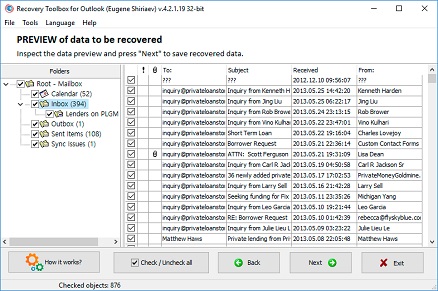
After that, on the second page of Recovery Toolbox for Outlook, the user will see the contents of the PST (Personal Store Table) file.


Explore your PST archive in a convenient preview pane. The stand-alone viewer gives you access to mailbox contents without importing the file into Outlook.
Key features of the PST viewer:


Browse large Outlook archives without importing them into an Outlook profile. The PST reader supports Unicode files, so you can explore mailbox folders and preview individual items in large archives.
Select a PST file, wait for its contents to load, and open the folder you need. Loading time and memory usage depend on the file and your computer’s resources.
The desktop PST viewer runs independently of Microsoft Outlook. You do not need an Outlook installation or a Microsoft 365 subscription to read your archive.
Install the viewer on your Windows PC, select a PST file, and browse its contents without connecting an email account.
In the very end of recovery, the Microsoft PST Viewer suggests the final evaluation where users check the recovery statistics, plus the amount of successfully recovered data. As a result, users may see how many items have been restored by the MS Outlook Viewer.
Explore the folder tree to see how your PST archive is organized. Select a folder and open individual messages or other items in the preview pane.
Check email contents, review contact details, and look through calendar entries from the same viewing interface.
Keep a PST reader available whenever you need to check a saved mailbox. Whether you are reviewing an old archive or opening a PST file shared by a colleague, you can browse its contents without setting up Outlook. Use the desktop viewer to inspect files locally on your Windows PC.

The PST viewer supports password-protected archives. Select your PST file in the program, wait for its contents to load, and browse the available folders and items in the preview pane.

Use the Online PST Viewer to browse a PST archive on your Mac without installing the Windows desktop application.
Upload your PST file and wait for its contents to load. Then browse the available mailbox items directly in your browser. You do not need Microsoft Outlook installed to use the online viewer.
The extensions of viewed files: pst and ost. The Online Service and Recovery Toolbox for Outlook views files Microsoft Outlook 98 / 2000 / 2002 / 2003 / 2007 / 2010 / 2013 / 2016 / 2019 / 2021 / 2024 and Outlook for Microsoft 365.
A short note from the engineer: When designing the Outlook PST Viewer, my main goal was to ensure maximum reading speed for huge Unicode data files (over 20GB) without risking system memory leaks. — Victor G. Bobrov, Lead Developer.
Question:
Answer:
Use Recovery Toolbox for Outlook to open the PST file without Microsoft Outlook installed. Download and install the Windows application, select your file, and wait for its contents to load.
You can then browse mailbox folders and preview emails, attachments, contacts, and calendar items free of charge.
Question:
Answer:
You don't need to pay for a Microsoft 365 or Microsoft Office license to view the contents of a PST file. Just download Recovery Toolbox for Outlook, install the tool, select the PST file on the program's first page, and wait for the file to be read before viewing its contents. Viewing a PST file (emails, contacts, appointments, and more) is a free feature of Recovery Toolbox for Outlook.
Question:
Answer:
There are special programs for reading PST files (PST Reader), or you can use Recovery Toolbox for Outlook, which offers a free PST file reading feature.
Question:
Answer:
Some of the free features of Recovery Toolbox for Outlook, including online viewing of PST files, have been moved to the Recovery Toolbox for Outlook website. You can go to select a PST file on the page in your browser, and view its contents after uploading and reading it on our site.
Question:
Answer:
Use the online version of Recovery Toolbox for Outlook:
Question:
Answer:
You can open PST files for free using the free version of Recovery Toolbox for Outlook. To do this:
Question:
Answer:
The desktop PST viewer works without Microsoft Office and lets you preview PST contents free of charge. If your company allows the application, install it and select the archive you want to read. Check with your IT team if software installation is restricted.
Question:
Answer:
The PST viewer supports older ANSI-format archives, including PST files created by Outlook 2000. Select the file and wait for its contents to load, then browse the available folders and preview individual items. You do not need to convert the archive to Unicode just to view it.
Question:
Answer:
The stand-alone PST reader supports large Unicode files. Select your archive in the desktop application and allow time for its contents to load before browsing the folders.
Processing time and memory usage vary depending on the archive and your PC. You can preview the available contents free of charge to check how the viewer handles your file.
Question:
Answer:
Download the free version of Recovery Toolbox for Outlook and install the program. On the first page of the program, select the password-protected PST file. Then wait for the file analysis to complete and view the contents of the password-protected PST file. Reading password-protected PST files for free is a free feature of Recovery Toolbox for Outlook.
Question:
Answer:
Yes. Open the file in the stand-alone PST viewer and browse its contents directly in the preview pane. You do not need to import the archive into Outlook, create an Outlook profile, or connect an email account.
Question:
Answer:
On the page https://outlook.recoverytoolbox.com/pst-viewer.html, you can select a PST file, upload it to a cloud service, and then view the contents of the PST file in a browser on your phone.
Question:
Answer:
The free version of Recovery Toolbox for Outlook works as a PST file viewer on Windows 11. You need to select a PST file on the program's first page, and then you can view the contents of the PST file in the preview pane, just like in a browser.
Question:
Answer:
The free version of Recovery Toolbox for Outlook functions as a file explorer for the contents of a PST file. Select the file to view on the first page of Recovery Toolbox for Outlook and browse emails and contacts from the file on the second page, just like in PST Explorer.
Question:
Answer:
The most convenient solution is to use the page https://outlook.recoverytoolbox.com/pst-viewer.html as an online PST file viewer for Mac, Android, iOS, and other systems. The page opens the PST file for viewing and reading. This web app page will function as a Mac PST Viewer, Android PST Viewer, iPhone PST Viewer, or Windows PST Viewer.
Question:
Answer:
Yes. Use the stand-alone PST viewer to open the archive separately from your usual email application. Select the PST file, browse its folders, and preview the available messages. You can keep using The Bat for your everyday email.
Question:
Answer:
Yes. Preview PST contents free of charge to see which folders and items are available. Browse messages, contacts, and calendar entries to understand what the archive contains before deciding whether to keep it.
Question:
Answer:
You can view data in a PST file after changing its encryption type because Recovery Toolbox for Outlook reads encrypted PST files of all encryption types.

Victor G. Bobrov, Senior Software Engineer.
MCSD, MCDBA
Microsoft Outlook data-file specialist with over 20 years of experience working with PST and OST files, including mailbox structures, file formats, and data viewing.

This page is maintained by Recovery Toolbox / File Master LLC and is connected to the author profile, company profile, legal pages and support resources so users and search engines can verify who is responsible for the PST Viewer content.

Victor Bobrov is listed as the author and reviewer of this PST Viewer guide and is connected in structured data as the creator of the Recovery Toolbox for Outlook PST Viewer.
Recovery Toolbox is connected on this page to its company profile and legal entity:
Editorial note: This page was updated and reviewed on . The visible author, company and policy links match the JSON-LD entities used in the page source.
A privacy-focused way to view Outlook PST files offline
100% Offline Privacy: Why local viewing is safer than online cloud viewers
Download for Windows Recovery Toolbox for OutlookPrivate offline recovery
Your data stays on your PC.
Preview emails and contacts
Use the free PST Viewer to check emails before saving.
Works with Outlook 97-2024
And Outlook for Microsoft 365.
Engineered by data recovery expert Victor G. Bobrov
Customer's reviews
By clicking Download or Upload file, you agree to the Terms of Service and EULA.
Choose how to view the PST file
Private offline PST Reader
Your data stays on your PC.
Free PST Viewer
Use the free PST Viewer to read emails, contacts and so on.
Opens PST files without Outlook
Does not require Microsoft Outlook to open PST file.
Progress
Please wait while the file is opened
Progress of file upload:
The program has no restrictions on the number and size of files